If you have sat in a Microsoft briefing lately, you have probably heard the Copilot Studio vs Azure AI Foundryquestion come up. Both platforms build AI agents. Both carry the Microsoft badge. Both keep appearing in the same procurement conversations.
So which one do you actually choose — and why?
The honest answer is that these are not competing tools. They are two layers of the same Microsoft AI stack, built for entirely different audiences and use cases. This guide gives you a clear, architect-level view of what each platform does, when to use it, and how they work together.
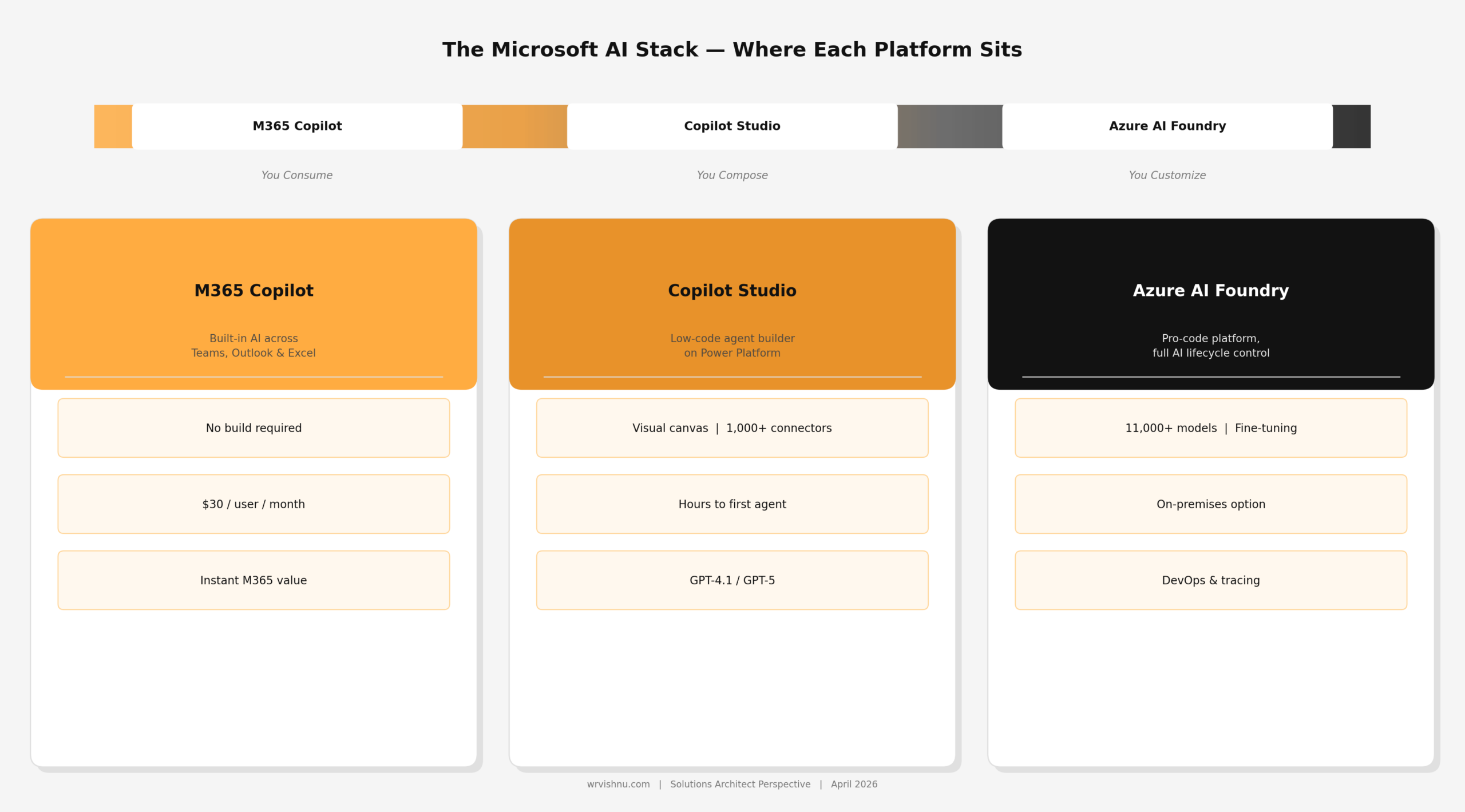 The Microsoft AI stack — where each platform sits
A Quick Naming Note
Before we compare — one clarification that trips people up.
Azure AI Foundry was rebranded from Azure AI Studio in November 2024. By early 2026, Microsoft increasingly refers to it simply as “Microsoft Foundry.” If you see either name in documentation, they refer to the same platform. The portal lives at ai.azure.com.
Copilot Studio evolved from Power Virtual Agents and is now the flagship low-code agent builder within the Power Platform family, available at copilotstudio.microsoft.com.
The One-Line Summary for Each Platform
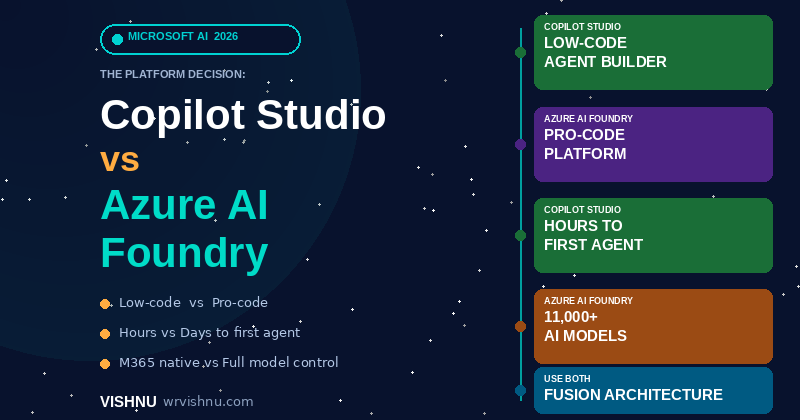
Copilot Studio — You compose. A low-code, SaaS agent platform built on Power Platform. Designed for business makers, analysts and IT teams who want to build and deploy conversational agents quickly — with minimal coding and deep Microsoft 365 integration.
Azure AI Foundry — You customize. A pro-code platform where engineering teams own the full AI lifecycle: model selection, fine-tuning, RAG pipelines, custom deployment and production-grade observability. Built for teams who need complete control.
Copilot Studio vs Azure AI Foundry: Side-by-Side Comparison
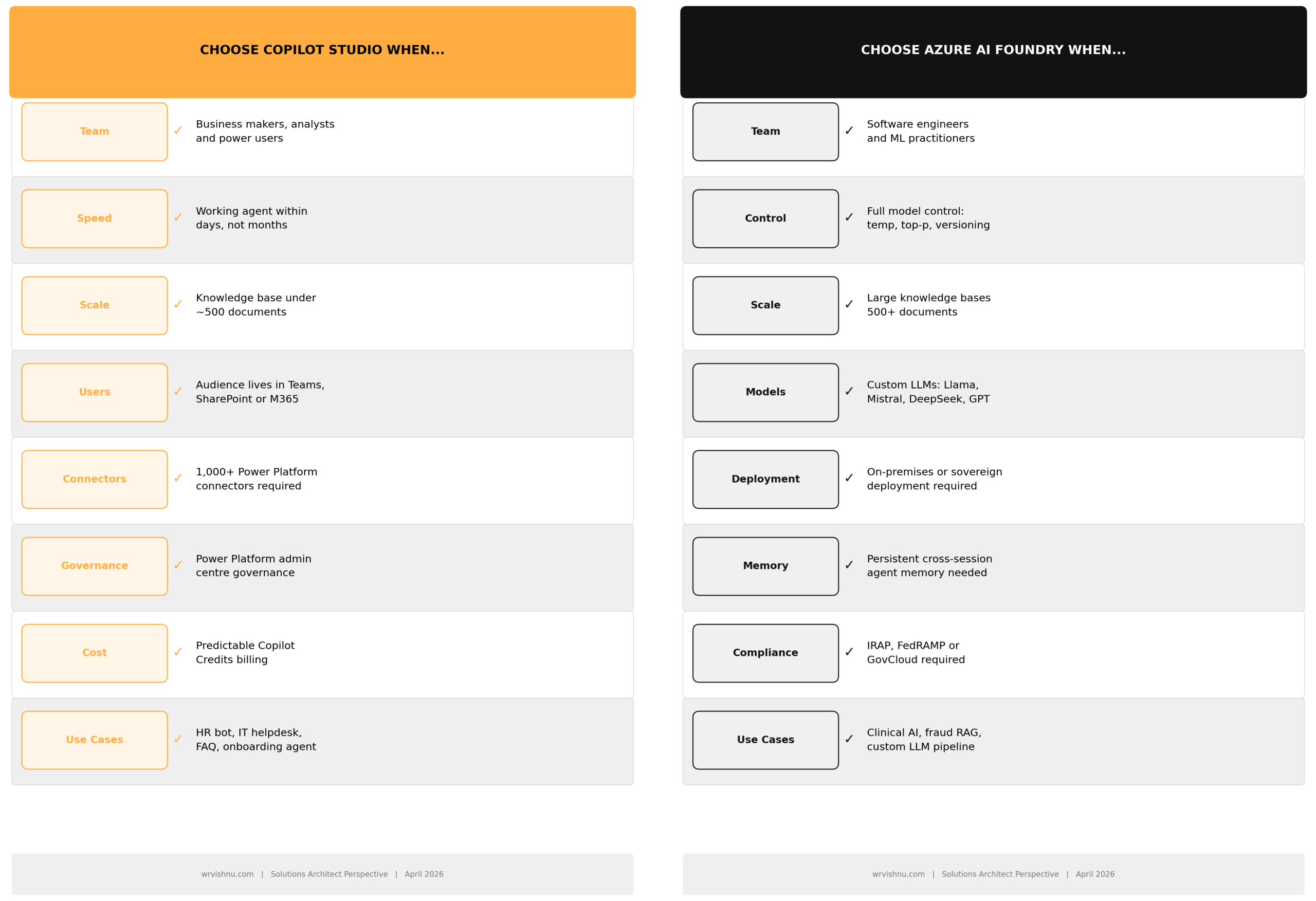 Copilot Studio vs Azure AI Foundry — key dimensions compared (April 2026)
Here is what that comparison means in practice:
Build speed matters most at proof-of-concept stage. Copilot Studio gets you a working agent in hours. Foundry gets you an enterprise-grade agent that scales to thousands of documents and multiple models — but the pipeline takes longer to stand up.
Model control is the real differentiator. Even though Copilot Studio now supports GPT-5 and can access 11,000+ Foundry models via bring-your-own-model, you still cannot adjust temperature, top-p, prompt versioning or evaluation gates inside Copilot Studio. That level of control belongs exclusively to Foundry.
Knowledge base scale sets a natural boundary. Copilot Studio works well for up to around 500 documents. Once you cross that threshold — or when your dataset spans technical manuals, clinical records or large regulatory libraries — Foundry and Azure AI Search are the right fit.
When to Choose Each Platform
When to use Copilot Studio vs Azure AI Foundry
Choose Copilot Studio when:
- Your team is made up of business makers, analysts or power users — not developers
- You need a working agent within days, not months
- Your knowledge base is under roughly 500 documents
- Your users live in Microsoft Teams, SharePoint or Dynamics 365
- You want 1,000+ Power Platform connectors with minimal plumbing
- Your governance sits in the Power Platform admin centre
- Use cases include: HR bot, IT helpdesk, onboarding agent, FAQ assistant
Choose Azure AI Foundry when:
- Your team has software engineers and ML expertise
- You need to fine-tune a model on proprietary data
- Your knowledge base is large or growing fast (500+ documents)
- You require on-premises or sovereign deployment (Foundry Local, expanded February 2026)
- You need custom model selection: Llama 3.3, Mistral, DeepSeek, Grok 4, or your own weights
- Long-term memory across agent sessions is essential
- Your industry requires IRAP, FedRAMP or GovCloud compliance
- Use cases include: clinical AI, fraud detection RAG, custom LLM training, multi-model pipelines
Pricing — What You Actually Pay
Copilot Studio uses Copilot Credits as its billing unit (changed from “messages” in September 2025):
- Prepaid pack: 25,000 Copilot Credits for USD $200 per month, per tenant — pool shared across all agents
- Pay-as-you-go: USD $0.01 per Copilot Credit via Azure subscription
- Included with M365 Copilot: Internal agent usage for licensed users does not consume credits
A typical complex grounded response costs around 12 credits (generative answer = 2 credits, tenant graph grounding = 10 credits).
Azure AI Foundry has no portal licence cost. You pay for the underlying Azure services consumed — model inference (token-based, varies by model), Azure AI Search, compute and storage. Fine-tuning a GPT-4o model in North Central US costs approximately $27.50 per million training tokens, plus $1.70 per hour for hosted model deployment.
Practical implication: Copilot Studio is easier to cost-model upfront. Foundry costs grow with complexity but offer more granular control over what you spend on.
The Architect’s Verdict — Use Both
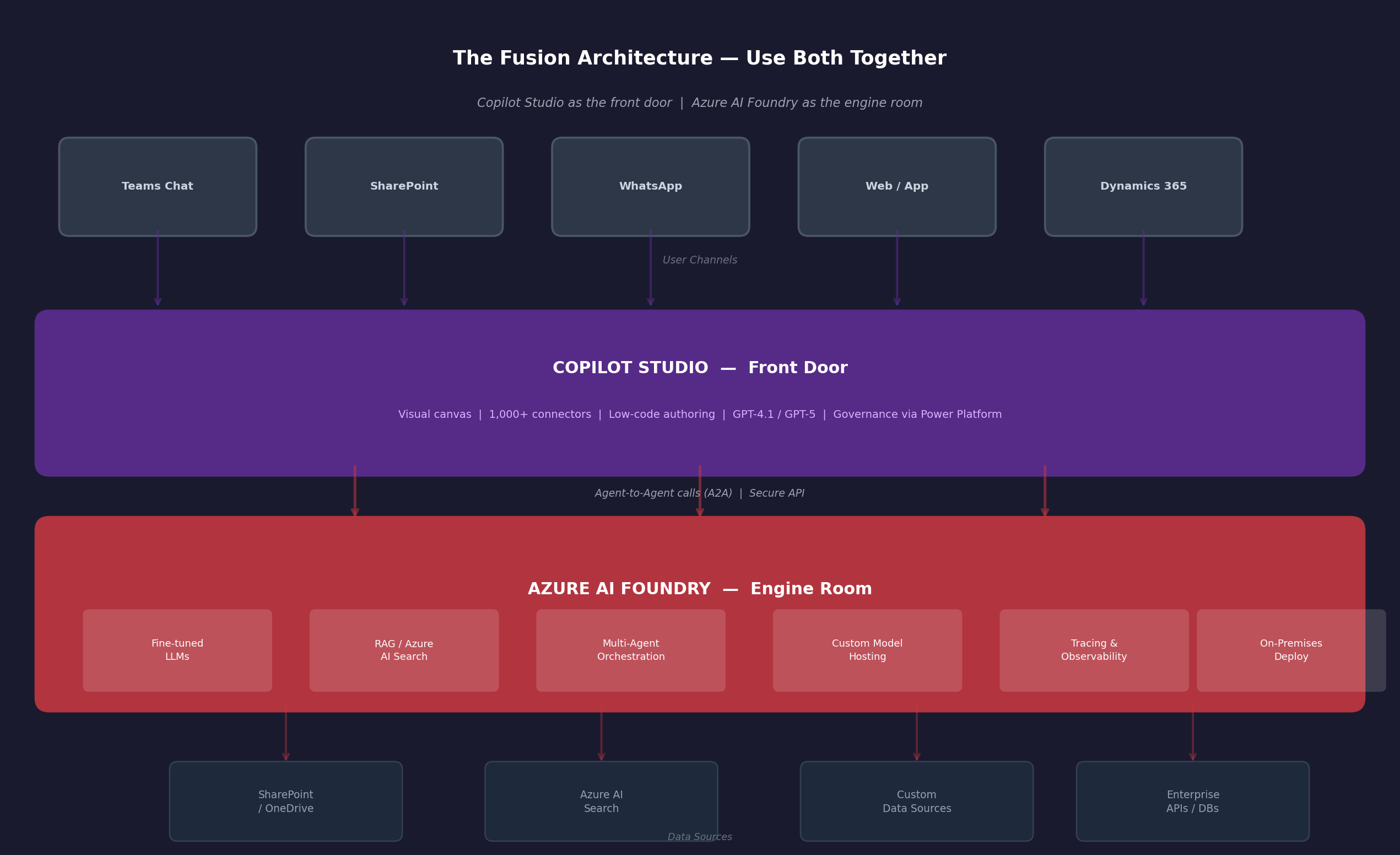 The fusion architecture — Copilot Studio as the front door, Azure AI Foundry as the engine room
The enterprise pattern that works in 2026 is not a choice between these platforms. It is a deliberate layering of both.
- Engineers build specialised tools, fine-tuned models and RAG pipelines in Azure AI Foundry
- Makers assemble the user-facing experience — Teams chat, SharePoint agent, WhatsApp bot — in Copilot Studio
- Agents communicate via the Agent-to-Agent (A2A) protocol
- Microsoft Agent 365 provides the unified governance and monitoring control plane across both
Think of it this way: Copilot Studio is the cockpit. Azure AI Foundry is the engine.
The common migration path is: start in Copilot Studio to prove value quickly, then graduate to Foundry when your use case outgrows the low-code guardrails. Many organisations run both permanently — Studio for departmental agents, Foundry for mission-critical pipelines.
If you are ready to start building, the step-by-step guide on creating a Copilot Studio agent for SharePoint walks through everything from knowledge sources to deployment.
Key Takeaways
- Copilot Studio is for speed, accessibility and M365-native deployment. If your team needs an agent running in Teams this week, start here.
- Azure AI Foundry is for control, scale and custom AI. If you need to own the full AI lifecycle — from model weights to production monitoring — Foundry is your platform.
- Both platforms are complementary by design. Microsoft built them to be interoperable. The best enterprise AI strategies use both.
- For Australian organisations in regulated industries: Foundry hosted agents are currently limited to North Central US (as of March 2026). On-premises deployment via Foundry Local is available for sovereignty requirements.
Frequently Asked Questions
What is the difference between Copilot Studio and Azure AI Foundry?
Copilot Studio is a low-code SaaS platform on Power Platform designed for business makers to build and deploy conversational AI agents quickly — with deep Microsoft 365 integration and 1,000+ connectors. Azure AI Foundry is a pro-code platform where engineering teams control the full AI lifecycle: model selection, fine-tuning, RAG pipelines, custom deployment and production observability. Copilot Studio is for speed and accessibility; Azure AI Foundry is for control and scale.
Can I use Copilot Studio and Azure AI Foundry together?
Yes — and this is the recommended enterprise architecture. Copilot Studio acts as the front door (Teams chat, SharePoint agent, WhatsApp bot) while Azure AI Foundry provides the engine room (fine-tuned models, RAG pipelines, advanced orchestration). Agents communicate via the Agent-to-Agent (A2A) protocol. Microsoft Agent 365 provides unified governance across both platforms.
How much does Copilot Studio cost compared to Azure AI Foundry?
Copilot Studio is billed in Copilot Credits. A prepaid pack costs USD $200 per month for 25,000 credits shared across your tenant, or $0.01 per credit on pay-as-you-go. Internal usage is included for Microsoft 365 Copilot licensed users. Azure AI Foundry has no portal licence fee — you pay for the underlying Azure services consumed: model inference (token-based), Azure AI Search, compute and storage. Fine-tuning a GPT-4o model costs approximately $27.50 per million training tokens in North Central US.
Is Azure AI Foundry suitable for Australian organisations with data sovereignty requirements?
Yes, with caveats. Azure AI Foundry’s hosted agent service is currently limited to North Central US as of March 2026, which is a consideration for Australian regulated industries. However, Foundry Local — expanded in February 2026 to support large multimodal models on NVIDIA GPU hardware — enables fully on-premises deployment with no cloud connectivity required. For IRAP-assessed workloads, review the current Azure Australia region compliance posture before committing to a deployment pattern.
When should I start with Copilot Studio and migrate to Azure AI Foundry?
Start with Copilot Studio when you need to prove value quickly with a departmental use case — an IT helpdesk bot, HR onboarding agent or FAQ assistant. Migrate to Azure AI Foundry when your knowledge base exceeds roughly 500 documents, you need model-level control (temperature, fine-tuning, prompt versioning), your compliance requirements demand it, or your agents need to embed into custom applications beyond the Microsoft 365 ecosystem. Many organisations run both permanently side by side.
Continue Reading: Microsoft Copilot Guides
Check out other [Microsoft Copilot blogs on this site](https://www.wrvishnu.com/category/copilot/) and save the link — more posts in this series are on the way.
References
- Copilot Studio 2026 Wave 1 Release Plan — Microsoft Learn
- Copilot Studio Licensing — Microsoft Learn
- 6 Core Capabilities to Scale Agent Adoption in 2026 — Microsoft Copilot Blog
- What’s New in Microsoft Foundry Dec 2025 & Jan 2026 — Foundry Blog
- Copilot Studio vs Microsoft Foundry — Microsoft Community Hub
- Building AI Agents: Choosing Between Studio & Foundry — Emergent Software
- Should I Use Copilot Studio or Azure AI Foundry? — Microsoft Inside Track