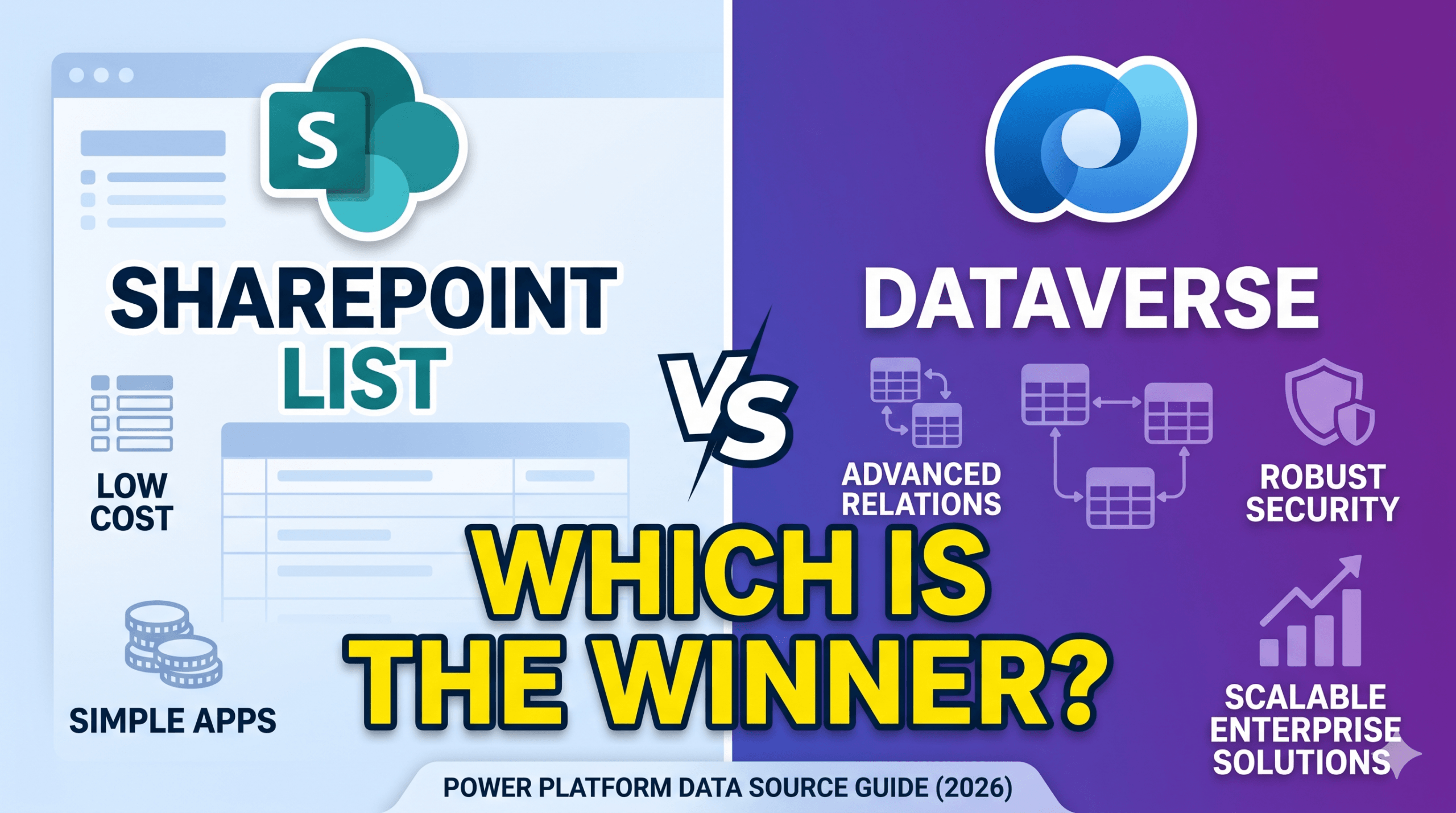
SharePoint List vs Dataverse is one of the most consequential decisions you will make when building a Power Apps canvas app or model-driven app. Choosing where your data lives is not a detail you can revisit cheaply. Pick the wrong data source and you will hit delegation limits, licensing walls, or performance ceilings that no amount of clever formula-writing can fix later.
In this SharePoint List vs Dataverse deep dive, we take a practical look at the two most common Power Platform data source options, covering what each one is, where it excels, where it falls short, and exactly when you should choose one over the other. We also briefly survey the broader connector ecosystem so you have the full picture. For Microsoft’s official guidance, see the Power Apps connections documentation and the Dataverse overview.
The Power Platform Data Source Landscape
Before we get into the SharePoint List vs Dataverse comparison itself, it helps to understand the wider field. Power Apps connects to over 900 data sources through its connector framework. These range from cloud databases and SaaS platforms to on-premises systems and flat files. Despite this breadth, the vast majority of real-world Power Platform solutions are built on one of five foundational data sources.
- SharePoint Lists — The most widely used starting point. Included in every Microsoft 365 licence at zero additional cost and familiar to most IT administrators.
- Microsoft Dataverse — The purpose-built relational database at the heart of the Power Platform. Required for model-driven apps and advanced governance scenarios.
- Excel on OneDrive — Suitable for rapid prototyping and single-user scenarios. Delegation is not supported, making it unsuitable for datasets above a few hundred rows.
- Azure SQL / SQL Server — Ideal when connecting to an existing enterprise database. Excellent delegation support and relational capability, but requires SQL licences and expertise.
- Third-party and Custom Connectors — Salesforce, ServiceNow, and hundreds more via the connector catalogue. Custom connectors can reach any REST API using an OpenAPI definition, but require developer involvement and careful DLP governance.
SharePoint Lists: The First Half of SharePoint List vs Dataverse
SharePoint Lists are structured, web-based tables that live inside a SharePoint site. Each list has columns (fields) and rows (items), with out-of-the-box support for versioning, item-level permissions, attachments, and views. Because every Microsoft 365 tenant already has SharePoint, lists are the lowest-friction starting point for Power Apps development and the natural starting point for any SharePoint List vs Dataverse evaluation.
What SharePoint Lists Do Well
Zero additional licensing cost. SharePoint Lists are included in every Microsoft 365 Business Basic, Business Standard, E1, E3, and E5 plan. You do not need a Power Apps Premium licence to connect canvas apps to SharePoint. The standard Power Apps licence covers it. This makes SharePoint the natural choice when rolling out solutions to large user populations where per-user cost is a constraint.
Familiar to business users and administrators. Most organisations already manage SharePoint lists through the browser interface. Creating columns, applying views, and setting permissions are tasks that non-developers can perform with confidence. This familiarity significantly reduces time-to-deployment and ongoing maintenance overhead for IT teams.
Built-in versioning and audit history. SharePoint Lists natively track every change made to every item, including who changed what and when. Major and minor versioning can be configured per list without any additional development. For simple compliance use cases such as approval workflows, asset registers, and incident logs, this is often sufficient without needing a dedicated audit table.
Item-level permissions. SharePoint’s permission model allows you to break inheritance on individual list items, granting or restricting access at the row level. This is powerful for scenarios such as expense forms where each employee should only see their own submissions, without requiring any code. Power Apps can leverage this transparently through the SharePoint connector’s user context.
Native Microsoft 365 integration. SharePoint Lists integrate natively with Power Automate, Power BI, Teams, and Outlook without additional connectors or configuration. A list item approval workflow can be triggered automatically via Power Automate, notify approvers in Teams, and surface a summary dashboard in Power BI, all with no-code tooling and no middleware.
SharePoint List Limitations You Must Understand
| Limitation | Impact and Workaround |
|---|---|
| 5,000 item view threshold | SharePoint enforces a list view threshold of 5,000 items. Queries that would return more than 5,000 rows are blocked at the server level. Indexed columns and filtered views are the primary mitigation, but large datasets still require careful architecture. |
| No true relational model | SharePoint has Lookup columns, but they are not foreign keys. There is no referential integrity, no cascading deletes, and no JOIN queries. Multi-table data models become extremely complex and slow in Power Apps when built on SharePoint. |
| Limited delegation support | Many Power Apps functions, including complex Filter combinations with OR logic, most string functions, and calculated columns, are not delegable to SharePoint. Non-delegable queries load only the first 500 to 2,000 rows locally, silently returning incomplete results. |
| No row-level security engine | While item-level permissions exist, managing them at scale is operationally expensive and can degrade list performance. Complex multi-tenant or department-scoped security models are very difficult to implement cleanly with SharePoint permissions alone. |
| 30 million item ceiling | The hard technical ceiling is 30 million items, but performance degrades well before that. Lists above 100,000 items require careful indexing strategy, and lists above 1 million items should be reconsidered entirely. |
Microsoft Dataverse: The Other Half of SharePoint List vs Dataverse
Microsoft Dataverse (formerly Common Data Service) is a cloud-based, relational data platform built specifically for the Power Platform. It stores data in tables with typed columns, enforces business rules and calculated fields at the platform level, and provides a rich security model that spans rows, columns, and business units. Dynamics 365 applications are built on Dataverse, which gives you a sense of the scale it is designed to handle in the SharePoint List vs Dataverse comparison.
What Dataverse Does Well
True relational data model. Dataverse supports one-to-many, many-to-many, and self-referential relationships between tables, with full referential integrity. You can model complex real-world data structures such as orders with line items, projects with tasks and resources, and customers with multiple contacts, in a way that is simply not possible to do cleanly in SharePoint Lists.
Full delegation support in Power Apps. Dataverse supports delegation for Filter, Sort, Search, and LookUp across all standard column types. When your canvas app applies a filter, the query executes on the server and only matching records are returned, regardless of whether your table has 10,000 or 10 million rows. This is the single most important technical advantage Dataverse holds in any SharePoint List vs Dataverse evaluation for data-intensive apps.
Role-based security with row and column-level control. Dataverse’s security model uses Security Roles assigned to users or teams. A role defines Create, Read, Write, Delete, Append, Append To, Assign, and Share privileges per table, scoped to User, Business Unit, Parent Business Unit, or Organisation level. Column-level security can additionally restrict specific fields such as salary or national insurance numbers to named users or profiles, independently of the table-level role.
Server-side business logic. Business rules, calculated columns, rollup columns, and plug-ins all execute on the Dataverse server, not in the app client. This means your data integrity rules are enforced regardless of whether the user is accessing data through a canvas app, a model-driven app, Power Automate, or the Dataverse API directly. In SharePoint, all validation logic lives in the app, making it easy to bypass.
Required for model-driven apps and Copilot Studio. Model-driven Power Apps, which auto-generate forms, views, and dashboards from your data schema, only work with Dataverse. If your roadmap includes model-driven apps, Dynamics 365 integration, or Copilot Studio agents that interact with structured data, Dataverse is not optional. It is the foundational layer those capabilities are built on.
Built-in auditing, rich data types, and file storage. Dataverse provides native audit logging at the table and column level: who created, modified, or deleted each record and what the previous values were, stored in a queryable audit history table. It also supports rich column types including Currency with multi-currency support, Choices as managed option sets shared across tables, Image, File, and polymorphic Lookup fields that can point to multiple table types.
Dataverse Limitations and Considerations
| Consideration | Detail |
|---|---|
| Requires Premium licence | Every user who interacts with a Dataverse-backed app must have a Power Apps Premium or Power Apps per-app licence, or an eligible Dynamics 365 licence. At the time of writing, Power Apps Premium is approximately $20 USD per user per month. For wide-organisation rollouts, this cost must be carefully evaluated. |
| Higher learning curve | Dataverse concepts such as environments, solutions, publishers, managed vs unmanaged layers, security roles, and ALM pipelines require meaningful investment to understand and operate correctly. Teams coming from SharePoint will find the initial ramp-up significant. |
| Storage costs | Dataverse storage is pooled across the tenant and allocated per licence. Large file volumes, extensive audit history, or high row counts can push tenants into additional storage purchases. |
| Overkill for simple scenarios | For a simple leave request form used by 50 people, Dataverse is architectural overkill. The licence cost, environment setup, and solution management overhead will dwarf the actual complexity of the application. Matching the tool to the problem is essential. |
SharePoint List vs Dataverse: Side-by-Side Comparison
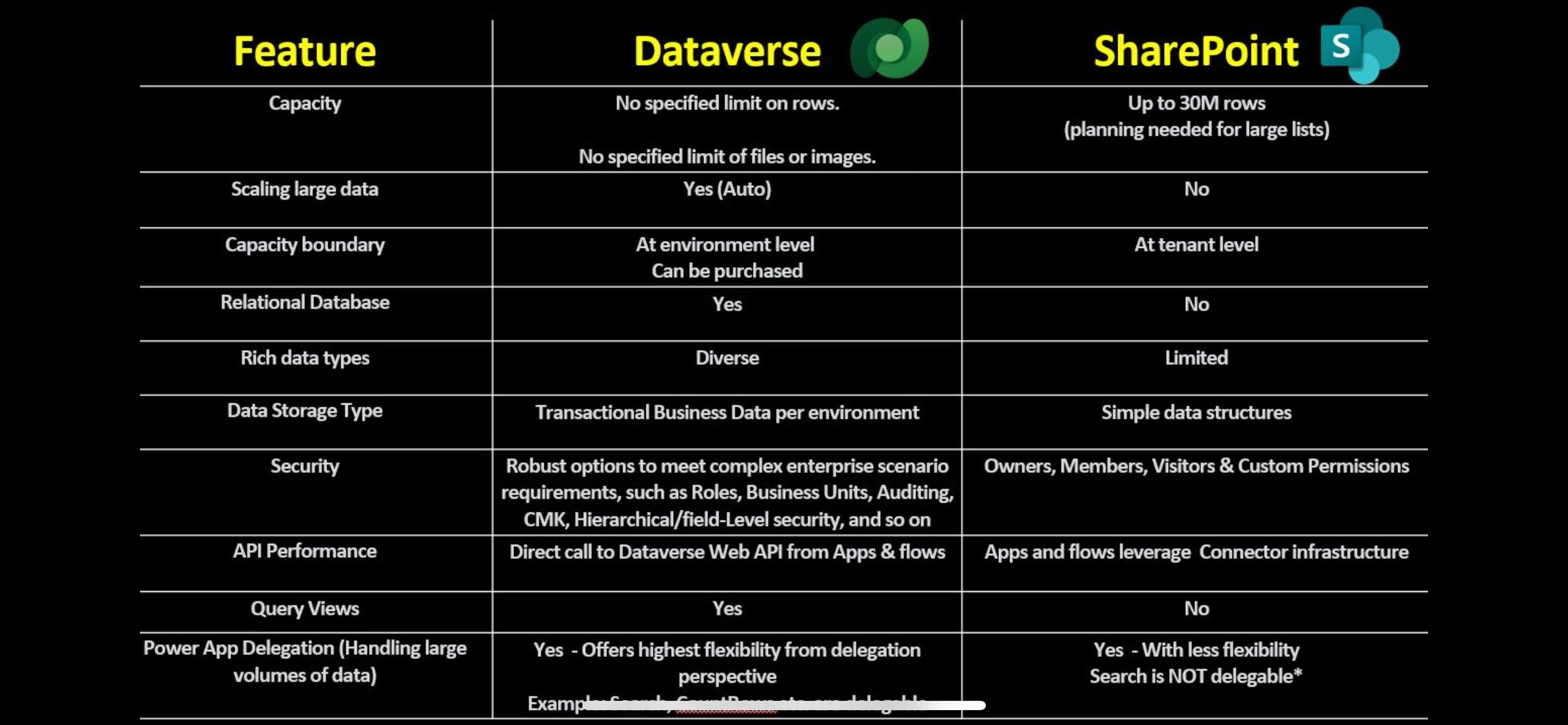
The table below summarises the key differences in the SharePoint List vs Dataverse decision across the dimensions that matter most when making an architectural choice.
| Dimension | SharePoint List | Dataverse |
|---|---|---|
| Licensing | Included in M365. Standard Power Apps licence sufficient. | Power Apps Premium licence required per user (~$20/user/month). |
| Data model | Flat lists with basic Lookup columns. No referential integrity. | Full relational model: 1:N, N:N, self-referential. Foreign keys enforced. |
| Delegation | Partial. Many functions not delegable. Hard limit at 5,000 items. | Full delegation for Filter, Sort, Search. Scales to millions of rows. |
| Security model | SharePoint groups and item-level permissions. No column security. | Security roles, Business Units, field-level security profiles. Granular. |
| Business logic | Client-side only, in the app. Easily bypassed via the list UI. | Server-side rules, calculated and rollup fields, plug-ins. Always enforced. |
| App types | Canvas apps only. | Canvas apps, model-driven apps, Copilot Studio, Dynamics 365. |
| Audit logging | List versioning. Limited field-level history. Not queryable via API. | Full audit history table. Queryable. Field-level old and new value capture. |
| ALM and DevOps | No native solution packaging. Manual export or PnP templates. | Solutions, publishers, managed layers, Power Platform CLI, Azure DevOps pipelines. |
| Best for | Simple forms, departmental tools, low row counts, broad user base. | Complex data models, enterprise apps, high volumes, strict governance. |
When to Use SharePoint Lists
In the SharePoint List vs Dataverse decision, SharePoint Lists are the right choice when most of the following are true for your scenario.
Your user population is large and cost-sensitive. If you are rolling out a solution to 500 frontline workers, hospital staff, or retail employees who already have Microsoft 365 licences, requiring each of them to have a Power Apps Premium licence adds $10,000 or more per month to your operating costs. SharePoint-backed canvas apps are included in the licences they already have.
Your data model is simple, covering one or two flat tables. Leave requests, asset registers, event sign-ups, safety checklists, and staff rosters are all single-table or two-table scenarios. There is no compelling reason to introduce Dataverse’s complexity when a well-structured SharePoint List will serve the data model perfectly.
Row counts will stay comfortably below 5,000. If your list will never grow beyond a few thousand rows, for example annual leave requests for a 200-person company, the 5,000 item threshold is never a practical concern. You can build, deploy, and operate with complete confidence.
The team is new to Power Platform. Starting with SharePoint Lists gives citizen developers an immediate win. They can see their data in the SharePoint UI, debug it directly, and build apps without needing to learn environments, solutions, or security roles. It is the ideal onramp for organisations beginning their Power Platform journey.
The solution needs to live inside a SharePoint site. Intranet portals, team sites, and departmental hubs often embed Power Apps directly in SharePoint pages. When the app and its data both live in the same site, SharePoint Lists give you a seamless, zero-friction integration story with no authentication gaps or connector dependencies to manage.
When to Use Dataverse
In the SharePoint List vs Dataverse decision, Dataverse is the right choice when your scenario demands any of the following.
You are building a model-driven app. There is no alternative. Model-driven apps only work with Dataverse. If your solution requires automatically generated forms across multiple related tables, a sitemap with multiple modules, dashboards, charts, and views driven by the data schema, Dataverse is the only supported backend.
Your data has complex relationships across multiple tables. If you are building a CRM-style system, a project management tool with tasks, resources, and milestones, or any application where five or more tables relate to each other with referential integrity requirements, Dataverse is the appropriate foundation. Trying to model this in SharePoint creates a brittle, slow, and unmaintainable architecture.
You expect data volumes above 50,000 rows. When you know your dataset will be large, covering field service records, inspection logs, IoT sensor readings, or order histories, Dataverse’s full delegation support and purpose-built database engine will deliver consistent performance where SharePoint would struggle. Plan for scale from the beginning rather than migrating later under pressure.
Strict data governance or compliance is required. If your solution handles personally identifiable information, financial data, health records, or any data subject to GDPR, ISO 27001, or sector-specific regulation, Dataverse’s column-level security, server-side audit logging, and environment isolation give you controls that SharePoint’s permission model simply cannot match.
You are integrating with Dynamics 365. Dynamics 365 Sales, Customer Service, Field Service, and Finance are all built on Dataverse. If your Power App needs to read or write to the same tables as a Dynamics 365 application, such as Accounts, Contacts, Cases, or Work Orders, you are already in Dataverse. Building a canvas app on SharePoint that then calls Dynamics 365 data via a connector creates unnecessary complexity and latency.
You need proper ALM and environment management. Dataverse solutions can be exported as managed or unmanaged packages and deployed across Development, Test, and Production environments via Power Platform CLI or Azure DevOps pipelines. This is the foundation of professional Power Platform development. SharePoint has no equivalent native mechanism. Teams either deploy manually or use community tools like PnP PowerShell, which lack the governance features of the Dataverse ALM model.
SharePoint List vs Dataverse: Quick Decision Guide
If you are still unsure which data source fits your scenario, run through these questions. A single “yes” in the Dataverse column is usually enough to tip the SharePoint List vs Dataverse decision.
| Question | Yes, use | No, consider |
|---|---|---|
| Do users already have Power Apps Premium licences? | Dataverse | SharePoint first |
| Will the table ever exceed 5,000 rows? | Dataverse | SharePoint fine |
| Do you need relationships across 3 or more tables? | Dataverse | SharePoint fine |
| Is this a model-driven app? | Dataverse only | Either option |
| Does the data touch Dynamics 365 tables? | Dataverse | Either option |
| Is column-level or field-level security needed? | Dataverse | SharePoint fine |
| Do you need Dev/Test/Prod environment separation? | Dataverse | SharePoint fine |
| Is the team new to Power Platform with no Dataverse experience? | SharePoint first | Either option |
Other Data Sources Worth Knowing
The SharePoint List vs Dataverse decision covers the majority of Power Platform use cases, but there are scenarios where other data sources are the better fit.
Azure SQL / SQL Server. If your organisation already has an investment in SQL Server or Azure SQL, connecting Power Apps directly to an existing database avoids data duplication and keeps your single source of truth intact. SQL offers excellent delegation support, mature tooling, and the ability to use stored procedures via Power Automate. The trade-off is that it requires a SQL licence and database expertise to manage, and the SQL connector is a Premium connector requiring Power Apps Premium.
Excel on OneDrive. Excel is appropriate only for single-user, prototype, or very low-volume scenarios. It does not support delegation, has no concurrent write safety (two users saving at the same time will cause data loss), and has no security model beyond file permissions. It is an excellent prototyping tool, but should never be used as the backend for a production app used by more than one person simultaneously.
Dataverse for Teams. Dataverse for Teams is a lightweight, embedded version of Dataverse available inside Microsoft Teams at no additional cost, included with select Microsoft 365 licences. It supports canvas apps built within Teams, basic tables, and Power Automate flows, but has capacity limits of 2 GB storage per environment and a maximum of one million rows. It does not support model-driven apps, plug-ins, or promotion to a full Dataverse environment without data migration. It sits neatly between SharePoint Lists and full Dataverse in terms of capability and cost.
Final Thoughts on SharePoint List vs Dataverse
There is no universal answer to the SharePoint List vs Dataverse question. The right data source is the one that matches your data complexity, your user volumes, your security requirements, your team’s maturity, and your budget, in that order.
Start with SharePoint Lists when you are building departmental tools for teams of any size who already have Microsoft 365, when your data model is simple, and when speed-to-value matters more than architectural perfection. Upgrade to Dataverse when you outgrow SharePoint’s delegation limits, need relational integrity across multiple tables, or when compliance and governance requirements demand server-enforced business logic and column-level security.
The most important part of any SharePoint List vs Dataverse decision is making the choice deliberately, understanding the trade-offs before the first row of data is written, rather than discovering the limitations of your chosen data source six months into a project.
Related Reading on wrvishnu.com
If you found this SharePoint List vs Dataverse guide useful, explore more related content on the blog:
What is the main difference between SharePoint List and Dataverse?
The main difference between SharePoint List and Dataverse is the data model and licensing cost. SharePoint Lists are flat tables included in every Microsoft 365 licence, with no referential integrity and limited delegation support in Power Apps. Dataverse is a purpose-built relational database with full delegation, server-side business logic, and column-level security, but it requires a Power Apps Premium licence for every user who interacts with the app.
Can I use SharePoint List with Power Apps without a Premium licence?
Yes. Connecting a Power Apps canvas app to a SharePoint List is covered by the standard Microsoft 365 licence. Users do not need a Power Apps Premium licence to run a canvas app backed by SharePoint. This is one of the most common reasons organisations choose SharePoint Lists over Dataverse when rolling out solutions to large user populations.
When should I use Dataverse instead of a SharePoint List?
Use Dataverse instead of a SharePoint List when you need any of the following: a model-driven app, data volumes above 50,000 rows, relational integrity across three or more tables, column-level security for sensitive fields, server-side business logic that cannot be bypassed, integration with Dynamics 365 tables, or a proper ALM pipeline with Dev, Test, and Production environments. A single yes to any of these is usually enough to justify the move to Dataverse.
What is the SharePoint List view threshold and how does it affect Power Apps?
SharePoint enforces a list view threshold of 5,000 items. Any query that would return more than 5,000 rows is blocked at the server level. In Power Apps, this compounds with delegation limitations: many Filter functions are not delegable to SharePoint, so non-delegable queries retrieve only the first 500 to 2,000 rows locally and silently return incomplete results. Indexed columns and carefully scoped filtered views help, but large datasets require a different data source entirely.
Does Dataverse require a Power Apps Premium licence?
Yes. Every user who opens a Power Apps canvas app or model-driven app backed by Dataverse must have a Power Apps Premium licence, a Power Apps per-app licence, or an eligible Dynamics 365 licence. At the time of writing, Power Apps Premium is approximately $20 USD per user per month. This licensing requirement is the most common reason smaller teams opt for SharePoint Lists despite Dataverse’s technical advantages.
What is Dataverse for Teams and how does it compare to full Dataverse?
Dataverse for Teams is a lightweight, embedded version of Dataverse available inside Microsoft Teams at no additional cost with select Microsoft 365 licences. It supports basic tables, canvas apps built within Teams, and Power Automate flows, but it has a 2 GB storage limit per environment and a maximum of one million rows. It does not support model-driven apps, plug-ins, or direct promotion to a full Dataverse environment without migrating data. It sits between SharePoint Lists and full Dataverse in terms of capability and cost.
Can SharePoint Lists be used with model-driven Power Apps?
No. Model-driven Power Apps require Microsoft Dataverse as their data source. There is no supported way to build a model-driven app on a SharePoint List. If your requirement includes auto-generated forms, views, dashboards, or a multi-module sitemap driven by a data schema, Dataverse is the only option. SharePoint Lists can only back canvas apps.