A Shift in the Power Platform Governance Landscape?
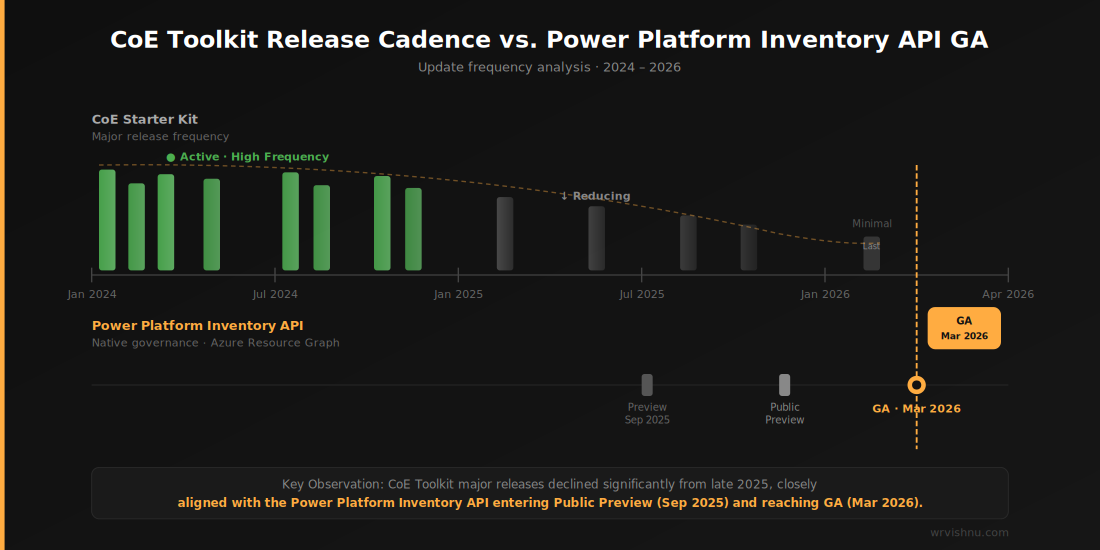
For years, Power Platform governance meant one thing: the Center of Excellence (CoE) Starter Kit. But as we move into 2026, the Power Platform Inventory API is changing that landscape — and a noticeable slowdown in major CoE updates since February 2026 is prompting architects to ask a sharper question: is the platform’s governance direction shifting for good?
The timing is hard to ignore. The Power Platform Inventory API reached General Availability (GA) in March 2026, closely aligned with the apparent reduction in CoE Toolkit release cadence. For Solutions Architects managing enterprise tenants, this is more than a coincidence worth noting — it may signal a deliberate platform pivot toward native, high-performance governance capabilities.
This post explores what the Power Platform Inventory API offers, why it matters for enterprise governance in 2026, and how you can start using it today alongside — or potentially instead of — the CoE Toolkit.
What Is the Power Platform Inventory API?
The Power Platform Inventory API is a native Microsoft service that surfaces tenant-wide resource metadata — apps, flows, environments, agents, and more — via the Azure Resource Graph. Unlike the CoE Toolkit’s approach of syncing data into a Dataverse environment through scheduled flows, the Inventory API queries resource state directly from Azure’s backend infrastructure.
This is a fundamentally different architecture. Rather than maintaining a parallel governance environment that mirrors your tenant, you’re querying the source of truth directly using Kusto Query Language (KQL) — the same query language used across Azure Monitor, Microsoft Sentinel, and Azure Data Explorer.
For architects familiar with the Azure ecosystem, this is a natural fit. For those coming purely from a Power Platform background, it represents a meaningful upskilling opportunity.
Official reference: For the full GA announcement, see the Microsoft Power Platform March 2026 Feature Update.
Why the CoE Toolkit Is Showing Its Age
The CoE Starter Kit has always been a community-driven, “heavy” solution. It is genuinely impressive engineering — but it carries real operational weight:
- Dedicated environment required — typically a managed environment with Dataverse capacity allocated solely for governance
- Sync flow dependency — scheduled flows that pull resource data can throttle, fail silently, or lag during peak periods
- Version upgrade cycles — keeping the toolkit current is a maintenance task in itself, often requiring careful testing before deploying into production governance environments
- Dataverse storage costs — for large tenants with tens of thousands of resources, storage consumption from CoE tables can become non-trivial
None of this is a criticism of the toolkit’s value. But it does explain why a native, API-first alternative is attractive — particularly in environments where operational simplicity and cost efficiency are governance priorities.
If you’re building your governance framework from scratch, our Power Platform architecture and governance articles cover the foundational decisions worth reviewing before committing to either approach.
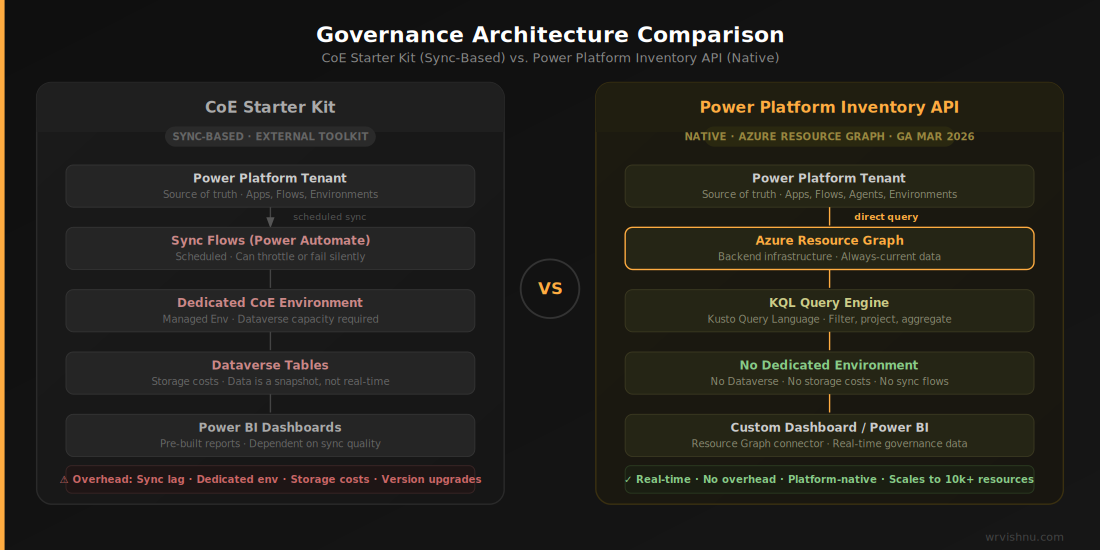
Power Platform Inventory API: Three Key Advantages for Enterprise Architects
1. Reduced Operational Overhead
Because the Power Platform Inventory API is served via Azure Resource Graph, there are no sync flows to monitor, no Dataverse capacity to manage, and no environment footprint to maintain. You query on demand. The data is always current.
This dramatically reduces the “governance of your governance tooling” burden — a real concern in regulated environments where every component in the estate needs to be maintained, patched, and documented.
2. Enterprise-Scale Querying
The API is designed for scale. Tenants with tens of thousands of canvas apps, flows, and agents can be queried in seconds using KQL, with filtering, projection, and aggregation all handled server-side. There is no “sync lag” between when a resource is created and when it appears in your governance view.
For architects running 2026 AI governance initiatives — particularly around Copilot Studio agent sprawl — this near-real-time visibility is operationally significant.
3. Platform-Native Consistency
Native tools evolve with the platform. When Microsoft ships a new resource type, it appears in the Inventory API schema. There is no waiting for a CoE Toolkit release cycle to support it. This is particularly relevant given the microsoft.powerplatform/copilotstudioagents resource type now available in the 2026 schema — critical for any organisation tracking AI agent proliferation across their tenant.
Exploring the 2026 Resource Schema
The Power Platform Inventory API’s 2026 resource schema provides visibility across the full platform estate, including:
| Resource Type | Governance Use Case | Native Support? |
|---|---|---|
microsoft.powerplatform/canvasapps |
App inventory, orphaned app detection | ✅ Yes |
microsoft.powerplatform/flows |
Flow audit, owner attribution | ✅ Yes |
microsoft.powerplatform/copilotstudioagents |
AI agent sprawl monitoring | ✅ Yes |
microsoft.powerplatform/managedenvironments |
Environment governance and compliance | ✅ Yes |
Full schema reference: Microsoft Learn:Power Platform Inventory API Resource Types
The addition of copilotstudioagents as a queryable resource type is arguably the most significant addition for 2026. As organisations accelerate Copilot Studio deployments, the ability to inventory agents by environment, owner, and last modified date provides a critical governance control point.
Sample KQL Query: Canvas App Inventory
The following KQL query can be run directly in the Azure Resource Graph Explorer to pull a tenant-wide canvas app inventory:
PowerPlatformResources
| where type == "microsoft.powerplatform/canvasapps"
| extend envId = properties.environmentId, owner = properties.createdBy
| project name, envId, owner, properties.lastModifiedAt
| order by todatetime(properties.lastModifiedAt) desc
What this returns:
- App name
- Environment ID
- Owner (createdBy principal)
- Last modified date, sorted most recent first
This is the foundation of a lightweight governance dashboard — no Dataverse, no sync flows, no dedicated environment required. From here, you can extend the query to filter by environment type, flag apps with no modification activity in 90+ days, or cross-reference owners against Entra ID groups for access reviews.
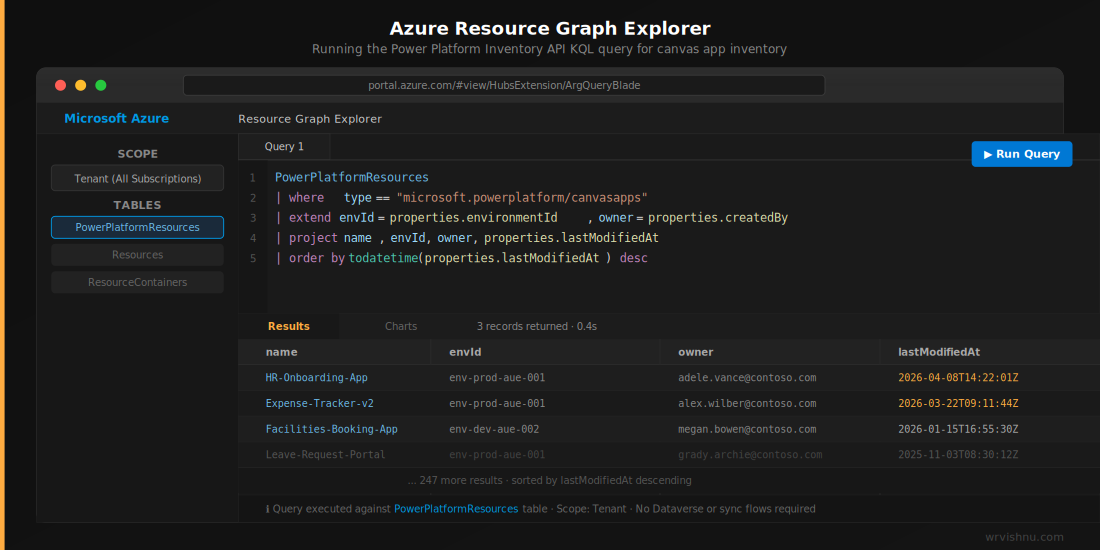
Strategic Outlook: The Agentic Center of Enablement
The 2026 Release Wave 1 governance roadmap introduces a concept that reinforces the direction of travel: the Agentic Center of Enablement, planned for June 2026. This positions AI agents as first-class governance participants — not just assets to be governed, but active contributors to the governance process itself.
In practical terms, this means automated governance workflows powered by agents: identifying orphaned resources, flagging policy violations, and triggering remediation — all natively, without a third-party toolkit in the loop.
For architects, this signals a clear investment thesis: Microsoft is building governance into the platform fabric, not on top of it. The Power Platform Inventory API is the data layer that makes this possible.
CoE Toolkit vs. Power Platform Inventory API: Which Should You Use?
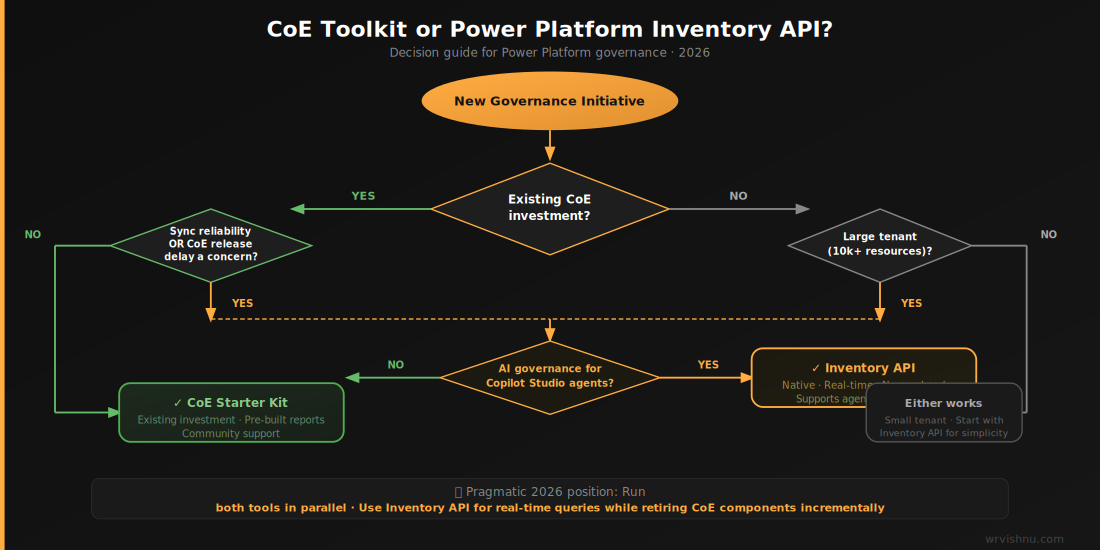
This is not a binary choice — at least not yet. Here is a pragmatic framing for 2026:
Stick with the CoE Toolkit if:
- You are already invested in it and your team is trained on its dashboards
- You rely on CoE’s pre-built Power BI reports and approval flows
- You need the community support layer for customisation
Evaluate the Inventory API if:
- You are starting a new governance initiative from scratch
- You operate a large tenant where CoE sync reliability is a concern
- You want governance tooling that evolves automatically with the platform
- You are building AI governance controls for Copilot Studio agents
The pragmatic 2026 position: Run both in parallel during a transition period. Use the Inventory API for raw resource queries and near-real-time data, while retiring CoE components incrementally as native capabilities mature.
Frequently Asked Questions
Is the Power Platform Inventory API free to use?
The API itself is part of the Power Platform platform services. Querying via Azure Resource Graph does not incur additional licensing costs beyond your existing Microsoft 365 / Power Platform licences, though Azure Resource Graph query costs may apply at scale. Verify with your licensing agreement for enterprise scenarios. For full pricing details, refer to the Azure Resource Graph pricing page.
Does the Inventory API replace the CoE Starter Kit?
Not officially — and not yet entirely. Microsoft has not deprecated the CoE Toolkit. However, the reduced update cadence and the GA of the Inventory API suggest a long-term directional shift. Architects should evaluate both tools based on their current tenant maturity and governance requirements. You can review the latest CoE Starter Kit release notes on the CoE Starter Kit GitHub repository.
What permissions are needed to query the Power Platform Inventory API?
You need at minimum the Power Platform Administrator role or delegated access via Azure Resource Graph reader permissions scoped to the Power Platform resource provider. Service Principal authentication is supported for automated querying. For a full breakdown of required roles and authentication options, see Microsoft Learn Power Platform administrator role.
Can I use the Inventory API data in Power BI?
Yes. Azure Resource Graph query results can be consumed via the Azure Resource Graph connector in Power BI, enabling you to build custom governance dashboards without Dataverse as the intermediary data store. For setup steps, refer to the Microsoft Learn Azure Resource Graph Power BI connector documentation.
What is the microsoft.powerplatform/copilotstudioagents resource type?
This is a 2026 schema addition that exposes Copilot Studio agents as queryable resources in the Inventory API. It allows governance teams to inventory agents by environment, owner, creation date, and last modified date — an important control for organisations managing AI agent proliferation. For the full list of supported resource types, refer to the Microsoft Learn Power Platform resource types in Azure Resource Graph.
Key Takeaways for Power Platform Architects
- The Power Platform Inventory API reached GA in March 2026 and represents a native, Azure Resource Graph–backed alternative to the CoE Toolkit’s sync-based approach
- The API supports KQL querying across all major resource types including the new
microsoft.powerplatform/copilotstudioagentstype, critical for AI governance - Reduced operational overhead (no dedicated environment, no sync flows, no Dataverse capacity) makes it an attractive option for large or cost-sensitive tenants
- The upcoming Agentic Center of Enablement (June 2026) reinforces Microsoft’s investment in native, API-first governance
- A pragmatic 2026 strategy runs both tools in parallel, using the Inventory API for raw data queries while evaluating CoE component retirement over time
Further Reading & Resources
- 📺 Power Platform Inventory API — Video Deep Dive (YouTube)
- 📝 Using the Power Platform Inventory API with PowerShell (Topedia Blog)
- 📖 Microsoft Learn — Power Platform Inventory API Schema Reference
Exploring Power Platform governance strategy for your organisation? Browse more architecture-level content in the Power Platform category on wrvishnu.com.