Microsoft 365 E7 is now generally available. As of 1 May 2026, the Frontier Suite — the first new enterprise tier Microsoft has released since E5 arrived in 2015 — is live, transactable, and actively being evaluated by IT and security leaders worldwide.
If you run M365 at any scale, Microsoft 365 E7 changes how you need to approach AI, identity, and security governance as a single problem rather than three separate workstreams.
This complete guide covers everything inside the suite: what Agent 365 actually does, how the five-layer operating model works, what the pricing looks like against the 2026 licensing changes, and what your team needs to do right now that it has shipped.
What Is Microsoft 365 E7?
Microsoft 365 E7 is what the company is calling the Frontier Suite. The name is deliberate. Microsoft’s argument is that the gap between organisations experimenting with AI and those deploying it with governance, trust, and security at scale is now a licensing and architecture decision as much as a technical one.
The suite brings four products together at $99 per user per month:
- Microsoft 365 E5 — security, compliance, and productivity foundation covering Defender, Purview, Intune, advanced compliance, and the full Office app suite
- Microsoft Entra Suite — the complete identity and network access layer, adding Entra Private Access, Internet Access, ID Governance, ID Protection, and Verified ID on top of what E5 already provides
- Microsoft 365 Copilot — the AI assistant embedded across Teams, Outlook, Word, Excel, PowerPoint, and SharePoint
- Agent 365 — the brand new control plane for governing AI agents across the entire organisation, also available standalone at $15 per user per month
Buying those four components separately, using post-July 2026 pricing, costs around $117 per user per month. Microsoft 365 E7 at $99 is approximately a 15% saving.
For a thousand-user organisation that is around $216,000 per year. For a 100,000-user government tenant, the saving becomes considerably more significant.
Microsoft 365 E7 is available with and without Teams, keeping things flexible for organisations that have already made separate Teams licensing decisions at an enterprise or government level.
The M365 E7 Frontier Suite is Microsoft’s clearest signal yet that enterprise AI governance is no longer optional and it is built into the licence tier itself.
The Four Components — What Microsoft 365 E7 Actually Delivers
Microsoft 365 E5 as the Foundation
E5 is unchanged inside Microsoft 365 E7. You get the same Defender for Endpoint, Defender for Office 365, Defender for Identity, Microsoft Sentinel, Purview compliance capabilities, Intune advanced device management, Power BI Pro, and the complete M365 productivity suite.
The practical thing that matters is the state of your E5 governance before you activate the E7-specific capabilities. Agents inherit your existing access model.
A poorly configured SharePoint permissions structure or unreviewed DLP policies will surface as real risk the moment Copilot and agents start operating on that data at scale. E7 amplifies what is already there — good and bad. That is why SharePoint access governance needs to come before agent deployment, not after.
Microsoft Entra Suite — What Goes Beyond E5
E5 gives you Entra ID P2: conditional access, Privileged Identity Management, and identity protection. The full Entra Suite in Microsoft 365 E7 adds three capabilities that matter specifically for Zero Trust architecture.
Entra Private Access replaces traditional VPN with Zero Trust Network Access for on-premises applications — per-app access rather than network-level access.
Entra Internet Access adds Secure Web Gateway controls for internet-bound traffic, with identity-aware filtering that works with conditional access policies already in place. ID Governance adds full lifecycle workflows, entitlement management, and access reviews for application access.
For organisations doing serious Zero Trust with Entra rather than just checking the box, the full Entra Suite inside E7 is one of the cleaner practical improvements over standalone E5.
Microsoft 365 Copilot — AI Inside a Governance Framework
Copilot in Microsoft 365 E7 is the same AI assistant that has been available separately, but now it ships inside a governance framework rather than alongside one you have to build yourself.
Purview Insider Risk Management covers Copilot interactions. Defender XDR surfaces AI-generated activity in the same investigation experience as endpoint and identity events. Entra controls which users and agents can access which capabilities.
One of the most consistent patterns in Copilot readiness work is that the productivity tool arrives first and the access governance conversation follows weeks later after the first over-sharing incident. E7 puts every tool needed to address that risk in the same licence agreement.
Microsoft 365 E7 and Agent 365 — The Control Plane That Changes Everything
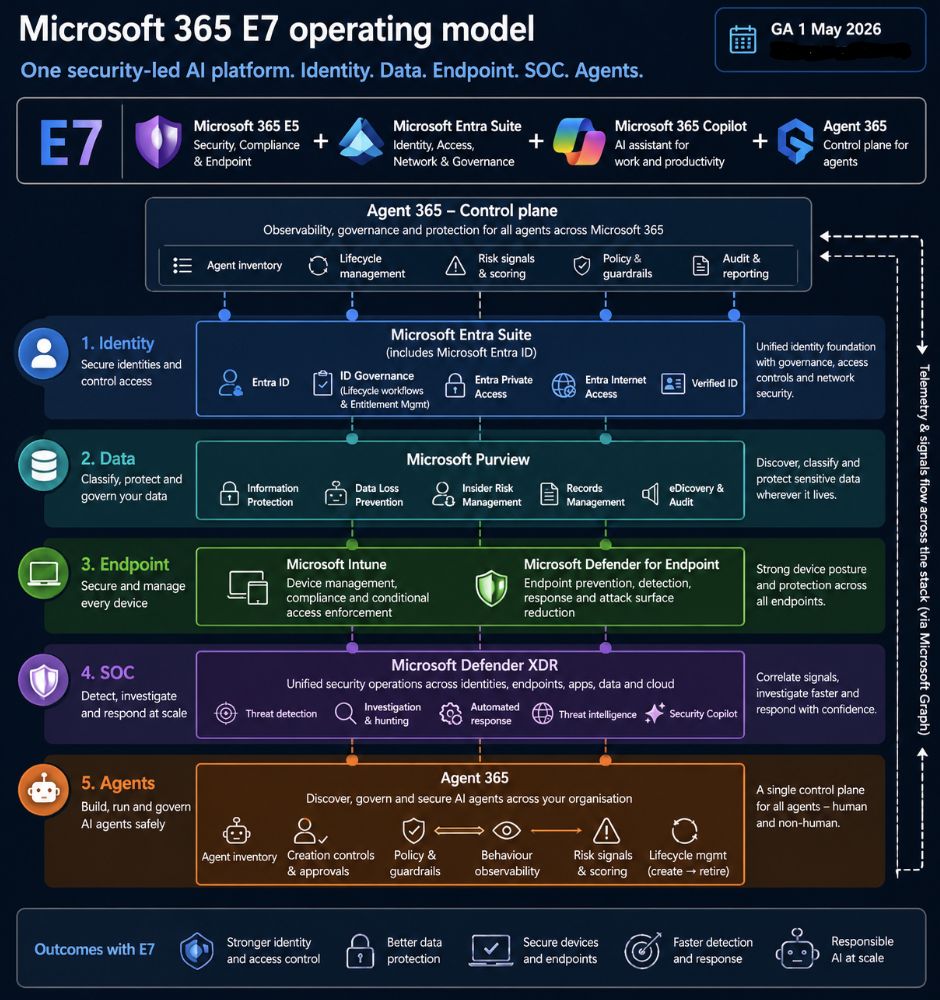
Agent 365 is the most significant new product in Microsoft 365 E7 and also the most commonly misread in initial reactions.
It is not a tool for building AI agents. That job belongs to Copilot Studio, Microsoft Foundry, and the M365 Agents Toolkit. Agent 365 is the governance layer — the control plane that lets IT and security teams see, manage, and secure every agent running in the tenant, regardless of how or where it was built.
The clearest way to understand Agent 365 is through the lens of what Purview did for data governance and what Entra did for identity. Before Purview, sensitive data was scattered across SharePoint, Exchange, Teams, and OneDrive with no unified classification layer. Agent 365 is doing the same consolidation job, but for AI agents.
The scale of the problem is real. Microsoft uses Agent 365 internally for visibility into over 500,000 agents. Most organisations today track their agents through spreadsheets or not at all. That is the gap Microsoft 365 E7 is designed to fill.
The Agent Registry
The Agent Registry is a centralised inventory in the Microsoft 365 Admin Center tracking every agent deployed in your tenant — built on Copilot Studio, deployed through Microsoft Foundry, from ecosystem partners, or registered manually through the API.
IT teams see this in the Admin Center. Security teams see the same data surfaced inside Defender and Purview. Same agents, same inventory, different views depending on who is looking.
Right now most organisations have agents scattered across Copilot Studio, Teams, SharePoint, and third-party services with no single place to see what exists or who owns it. The Agent Registry in Microsoft 365 E7 makes that inventory visible. You cannot govern what you cannot see.
Entra Agent ID — Identity for Non-Human Identities
Through its Entra integration, Agent 365 treats agents as identities rather than just applications. Each agent can be assigned a scoped identity, permissions tied to that identity, and policy coverage under the same conditional access and least-privilege principles that apply to human users.
You would not give a new employee admin access to every system on day one. The same discipline applies to an agent. With Entra Agent ID, you define what each agent can access, under what conditions, and with what review cycle — enforced through conditional access policies already in your tenant.
Purview and the Risky AI Usage Policy Template
Purview Insider Risk Management now extends its coverage to agent behaviour as a first-class policy category. The dedicated Risky AI usage template detects prompt injection attempts, unauthorised access to protected materials, and data leakage from agent actions.
For regulated sectors — government, financial services, healthcare — this is the part of Microsoft 365 E7 that makes the compliance story around agents credible. If a compliance team needs to demonstrate what an agent accessed, when, and what triggered a policy response, those audit-ready logs now exist.
Those signals feed into Defender XDR for a consolidated view of AI-related risk across the whole tenant.
Defender XDR — Agents in the Security Investigation
Defender XDR now includes a dedicated asset blade for AI agents, giving security teams a view of every registered agent, the ability to spot misconfigurations, flag anomalous behaviour, and run advanced hunting queries against agent activity data from Copilot Studio.
On the threat side, Microsoft 365 E7 adds protection for AI-native attack vectors: prompt manipulation, model tampering, and agent-based attack chains that would not surface in a traditional endpoint or identity investigation.
Runtime threat protection entered public preview in April 2026. Security posture management for Foundry agents is still in preview at GA, but the core Defender visibility for agents is live.
What Agent 365 Does Not Yet Cover
The version that shipped on 1 May covers governance for agents operating on behalf of licensed users — the on-behalf-of flow that covers most of what organisations are deploying right now.
The scenario where an agent has its own independent identity, its own mailbox, and operates autonomously as a digital teammate is still in the Frontier program with trial licences extended to December 2026. What GA delivers is the control plane for agents most organisations are actually running today.
The Microsoft 365 E7 Operating Model — Five Layers, One Control Plane
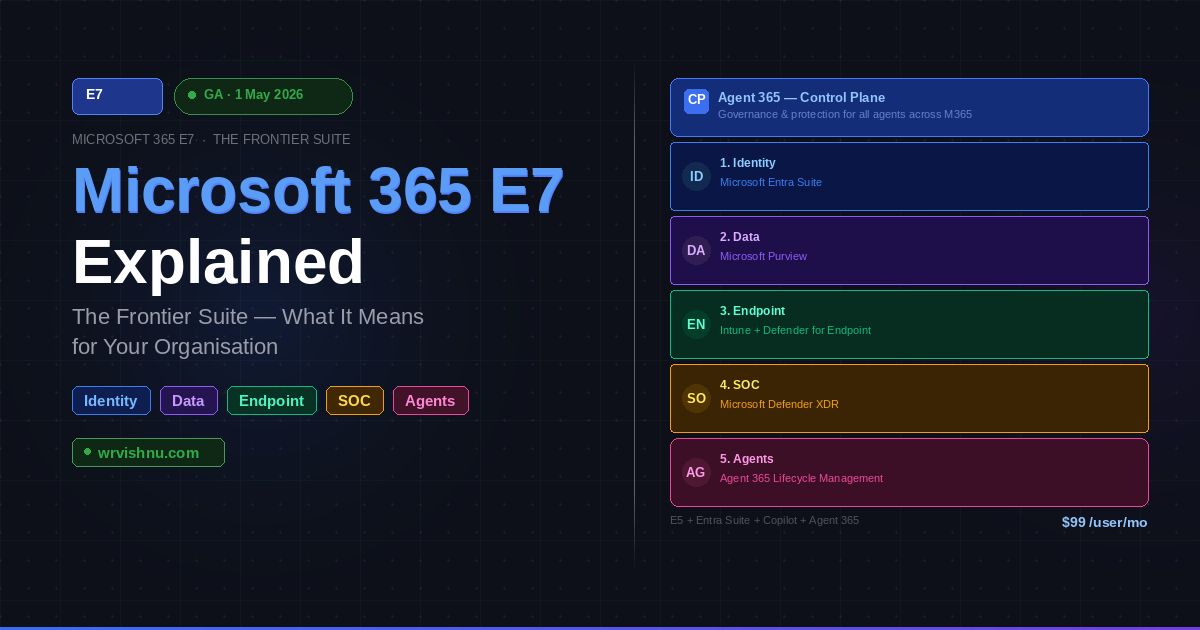
The operating model Microsoft 365 E7 ships with maps the suite to five operational areas, with Agent 365 sitting across the top as the control plane and telemetry flowing across the entire stack via Microsoft Graph.
Identity runs on the full Microsoft Entra Suite — Entra ID, ID Governance, Private Access, Internet Access, and Verified ID managing both human and non-human identities under one framework.
Data is governed through Microsoft Purview — Information Protection, DLP, Insider Risk Management, Records Management, and eDiscovery working together to classify, protect, and govern sensitive data wherever it lives, including inside AI interactions.
Endpoint is covered by Microsoft Intune for device management and compliance alongside Microsoft Defender for Endpoint for prevention, detection, response, and attack surface reduction.
SOC is powered by Microsoft Defender XDR, providing unified security operations across identities, endpoints, applications, data, and cloud workloads — with Security Copilot capabilities for the agent-specific hunting scenarios new to this release.
Agents are managed through Agent 365, covering the full lifecycle from inventory and creation controls through policy guardrails, behaviour observability, risk scoring, and retirement.
The telemetry layer via Microsoft Graph is what makes this architecture coherent. Signals flow across identity, data, endpoint, and SOC layers so Defender can correlate an agent’s behaviour against identity risk and data classification simultaneously. That is the difference between genuine security integration and five separate consoles that happen to share a logo.
Microsoft 365 E7 Pricing in the 2026 Licensing Context
The $99 headline needs to sit alongside the broader 2026 pricing picture to make complete sense.
Microsoft is raising prices on M365 commercial subscriptions from 1 July 2026. E3 moves from $36 to $39 per user per month and E5 from $57 to $60.
For any organisation currently running E5 plus a standalone Copilot licence, the a la carte total climbs to $117 after July. That makes the Microsoft 365 E7 bundle saving more meaningful on a like-for-like basis than it appears today.
Three promotional offers are available in the GA launch window with discounts between 10% and 20%. Those are time-limited, so they are worth factoring into any renewal conversation happening right now.
Agent 365 is also available independently at $15 per user per month for organisations where the full Microsoft 365 E7 bundle does not make sense but the agent governance control plane does.
When you break down the M365 E7 license cost against post-July 2026 a la carte pricing, the bundle saves roughly $18 per user per month — around $216,000 annually for a thousand-seat organisation.
Who Should Be Evaluating Microsoft 365 E7 Right Now
The clearest fit for Microsoft 365 E7 is an organisation already running E5 with active Copilot deployments or pilots in progress and agents starting to appear across the tenant through Copilot Studio, Teams, or third-party tooling.
For that environment, E7 consolidates four separate purchasing and renewal cycles into one governance framework, and the capabilities are immediately usable rather than directional.
Regulated sectors will find the Purview and Defender integration for agent activity particularly relevant. The moment an agent touches data under regulatory protection, the compliance question is not just what it did but whether you can prove it.
Organisations still on E3, not yet deploying Copilot, or with significant access governance debt should approach Microsoft 365 E7 carefully. The $99 licence does not resolve governance debt — it makes the consequences of that debt more visible at AI scale.
The priority in that situation is clearing access review backlogs, applying sensitivity labels to data that matters, and establishing a DLP baseline. See the Copilot governance guide for a practical baseline checklist. For environments under 300 users, Business Premium remains the more economical path.
The Microsoft 365 E7 vs E5 decision comes down to one question: do you have active Copilot deployments and agents already running in your tenant? If yes, E7 consolidates the governance tooling you are already buying separately. If not, E5 remains the right foundation to build on first.
What to Do Now That Microsoft 365 E7 Is Live
Five actions for the first 30 days with Microsoft 365 E7
Run the Agent Registry first. Turn on the Agent Registry in the M365 Admin Center and let it discover what is already running. Most organisations are surprised by the count. You cannot govern what you have not inventoried.
Define your agent creation policy. Who is allowed to build and publish agents? What approval process exists before an agent connects to production data? These are policy decisions, not technical ones, and they need to be documented before agents proliferate further.
Review your SharePoint and Teams access model. Agents acting on behalf of a licensed user inherit that user’s access. If users have over-broad permissions across SharePoint sites — common in tenants that grew without enforced access governance — agents carry the same over-broad access.
Enable the Purview Risky AI usage policy template. This is a day-one action for any regulated environment. It detects prompt injection attempts, unauthorised data access by agents, and data leakage from agent outputs. The policy is only as effective as your underlying sensitivity label coverage.
Bring your SOC team into the agent conversation. Security operations teams need to know how the new agent asset blade in Defender XDR connects to the existing incident queue, what advanced hunting queries are available, and how Purview risk signals surface in unified investigation. This is new territory for most SOC teams and the earlier they are involved the better.
Beyond the first 30 days, agent governance needs to be a standing operational function. Agent 365 covers the full lifecycle from creation through to retirement, and the retirement side is where governance programmes most often break down.
Abandoned agents with active permissions are exactly the kind of access hygiene issue that shows up in post-incident analysis. Building the decommissioning workflow is as important as building the onboarding one.
For official documentation, the Microsoft Partner Center April 2026 announcements page covers the Microsoft 365 E7 CSP availability details. The original Microsoft Blog announcement from Judson Althoff has the full positioning. The Microsoft licensing news page covers current pricing including the July adjustments.
My Take on Microsoft 365 E7
The most interesting thing about Microsoft 365 E7 is not the bundle price or the component list. It is where Agent 365 sits — at the top of the operating model as the control plane, not bolted on at the bottom as a compliance afterthought.
Microsoft is saying explicitly that agent governance is a first-class security and operations concern from day one. That framing is correct.
But framing and organisational reality are two different things. The licence turns up first. Then come the conversations about who owns agent governance, which team is accountable when an agent does something unexpected, how permissions are reviewed, and who disables it on a Friday afternoon when an incident happens.
Those are organisational decisions that no licence tier resolves automatically.
What Microsoft 365 E7 does well is put every tool needed for those conversations — identity governance, data protection, security operations, and agent lifecycle management — into one architecture with one licensing agreement and one renewal cycle.
The organisations that will get the most out of E7 are the ones that treat GA as the starting gun for governance work, not the finish line. The licence is live. The agents are already there. The question now is whether the governance framework is keeping pace.
If you are working through Microsoft 365 E7 adoption, agent governance policy, or Copilot readiness in a large M365 environment, drop a comment below or get in touch directly.
References
- Microsoft Official Blog — Introducing the First Frontier Suite Built on Intelligence and Trust — Judson Althoff, March 2026
- Microsoft Partner Center — April 2026 Partner Center Announcements — M365 E7 CSP availability
- Microsoft Licensing — 2026 Microsoft 365 Packaging and Pricing Updates
- Microsoft Security — Enterprise Security Suite pricing including Entra Suite
- Microsoft Learn — Microsoft Purview Service Description and licensing guidance