Microsoft 365 E7 Is Now Live: The Ultimate Breakdown Most Powerful Enterprise AI SuiteAsk any IT leader what keeps them up at night right now and you will hear a pretty consistent answer: agents. Not because agents are bad, but because they are everywhere and nobody has a clean picture of what is actually running, what data it is touching, or who owns it. That is the problem Microsoft Agent 365 was built to solve, and it is one of the more architecturally interesting things Microsoft has shipped in a while.
Announced at Microsoft Ignite 2025 and generally available from 1 May 2026 as part of the Microsoft 365 E7 Frontier Suite, Microsoft Agent 365 is Microsoft’s control plane for AI agents. If you are already running Microsoft 365, a lot of this will feel familiar in the best possible way. Rather than a net-new platform requiring new skills and tooling, Microsoft extended the management, security, and governance frameworks you already operate and built agent management on top of them.
This post covers what Microsoft Agent 365 actually is, how its core capabilities work, and what it practically means for your organisation’s AI adoption and governance strategy. I have focused on the enterprise and Solutions Architect angle throughout because that is where most of the genuinely interesting decisions live. If you are new to Copilot agents generally, the Copilot agents section on this blog is a good starting point before diving into governance.
Official product page: Microsoft Agent 365
What Is Microsoft Agent 365?
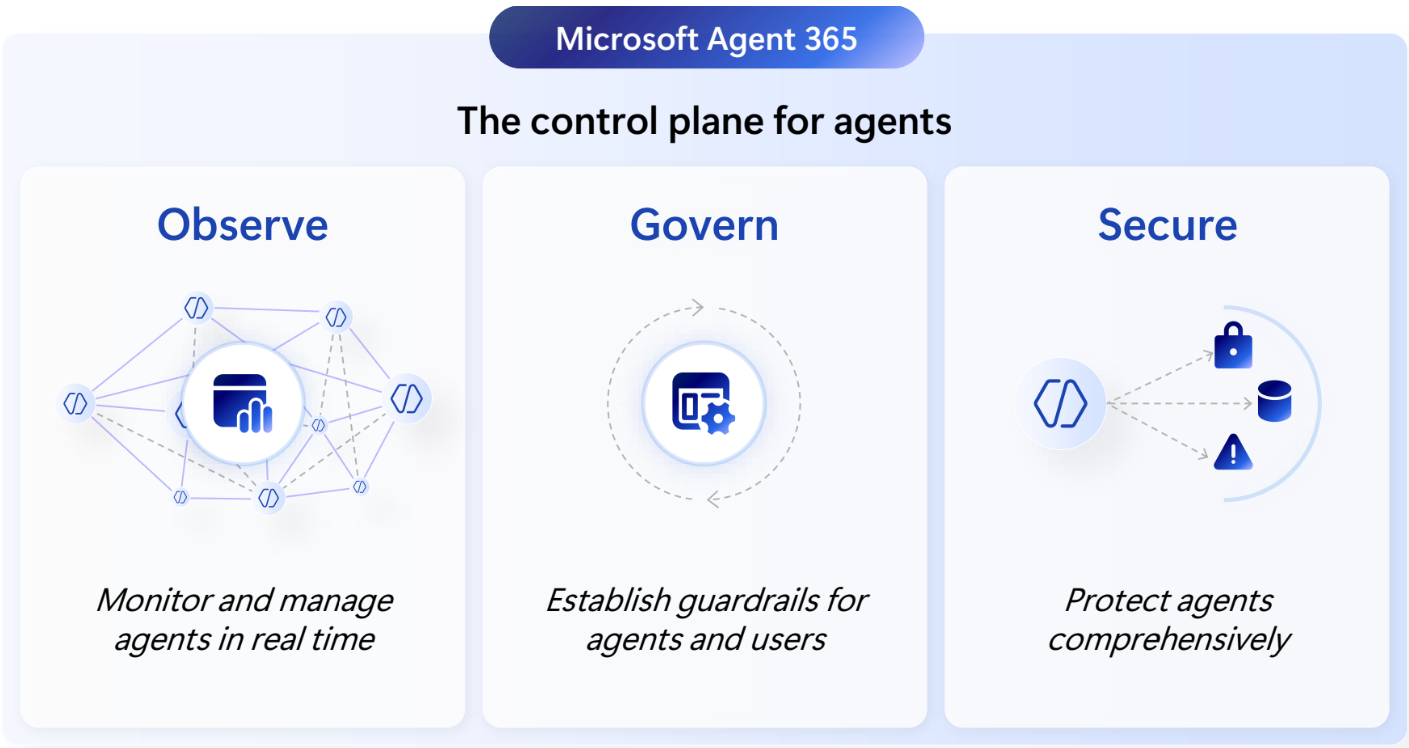
The short version: Microsoft Agent 365 is the management and security layer for AI agents across your organisation. Microsoft describes it as “the control plane for agents,” and that framing is worth sitting with for a moment.
Think about how your organisation manages endpoints. You have Intune for device management. You have Microsoft Entra ID for user identities. You have Defender for threat protection. Those tools exist because unmanaged endpoints and unmanaged identities create security and compliance exposure that organisations cannot tolerate at scale. Agents are now in exactly the same position that endpoints were ten years ago: proliferating rapidly, inconsistently provisioned, and largely invisible to IT.
Charles Lamanna, President of Business Apps and Agents at Microsoft, described the design philosophy simply: “The best way to manage agents is to extend the infrastructure you use for managing users.” Microsoft Agent 365 does exactly that. It extends Entra, Defender, Purview, and the Microsoft 365 Admin Center to treat agents as fully managed entities, the same way they already treat users and devices.
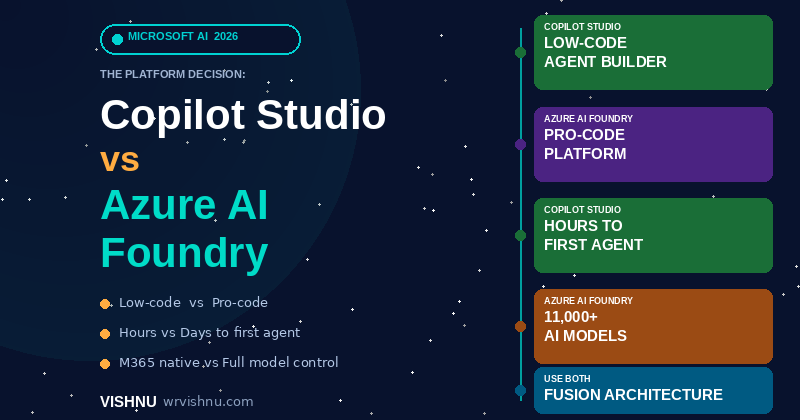
One clarification worth making early: Microsoft Agent 365 is not a replacement for Microsoft 365. They are designed for different things. Microsoft 365 is built for your people. Agent 365 is built for your agents. Microsoft calls organisations running both the “Frontier Firm,” meaning human-led but increasingly agent-operated. That is the direction most large enterprises are heading whether they planned for it or not. For context on how Copilot Studio fits alongside this, see the post on Copilot Studio governance versus Azure AI Foundry.
Why Organisations Need Microsoft Agent 365 Right Now
It is easy to read “AI agent management platform” and think this is something to worry about in a year or two. The data suggests otherwise.
A KPMG AI Quarterly Pulse Survey from September 2025 found that 42% of large organisations have already deployed AI agents, up from just 11% two quarters earlier. According to KPMG data cited by Microsoft on the Entra Agent ID product page, 76% of leaders expect their employees to be actively managing agents within two to three years. And 78% of organisations are concerned about the cybersecurity risks those agents introduce. That last number is telling: the deployment wave and the governance concern are growing at exactly the same time.
Gartner predicts that 40% of enterprise applications will be integrated with task-specific AI agents by the end of 2026, up from less than 5% just twelve months ago. By 2029 they estimate 70% of enterprises will deploy agentic AI as part of IT infrastructure operations, and at least 50% of knowledge workers will need skills to work with, govern, or create agents on demand.
Forrester adds a governance-specific signal: 60% of Fortune 100 companies are predicted to appoint a dedicated head of AI governance in 2026. Gartner also warns that more than 40% of agentic AI projects will be cancelled by the end of 2027 due to escalating costs, unclear business value, or inadequate risk controls. That is not a small number, and it is directly relevant to why governance infrastructure matters.
The underlying problem is agent sprawl. Departments deploy agents independently. Shadow agents appear that IT did not commission and cannot track. Agents accumulate access permissions provisioned too broadly because nobody had a framework for scoping them. Audit asks for a log of AI interactions and the answer is a shrug. If any of that sounds familiar, Microsoft Agent 365 is directly relevant to where your organisation is heading.
Microsoft Agent 365 Core Capabilities: What You Actually Get
Microsoft Agent 365 organises its capabilities across five areas: Registry, Access Control, Visualisation, Interoperability, and Security. Here is what each one means in practice.
Agent Registry: Start With Visibility
You cannot govern what you cannot see. The Microsoft Agent 365 registry provides a complete inventory of every agent operating in your environment, including agents with a Microsoft Entra Agent ID, agents you register manually, and shadow agents deployed without IT involvement.
Agents published through Microsoft 365 channels and registered with an Entra Agent ID appear automatically. Agents built outside those channels require additional registration steps, which is worth flagging if your organisation uses third-party or open-source agent frameworks. You will need to account for that onboarding work as part of your adoption plan.
The registry is the baseline everything else is built on. Before deciding which new agents to deploy, use it to understand what is already running. In most organisations that go through this process, there are more agents active than IT expected.
Access Governance and Conditional Access
Agents need access to data and systems to function, and left without a governance framework, they tend to accumulate far more access than they actually need. Permission sprawl in agent identities creates real security exposure, because an over-privileged agent that gets compromised or behaves unexpectedly has a larger blast radius.
Microsoft Agent 365 enforces least privilege access, meaning agents are only provisioned with access to the specific resources required for their assigned tasks. Beyond that, it applies Conditional Access policies from Microsoft Entra to agents, in the same way those policies already apply to users and devices. If an agent shows anomalous behaviour or attempts to access a resource under risky conditions, access can be blocked in real time without manual intervention.
IT-defined guardrails let administrators set policies for who can create, onboard, and manage agents across the organisation. Every agent gets a sponsor: the person or team accountable for that agent’s behaviour and access throughout its lifecycle. This sponsor model is one of the more practically useful governance mechanisms in Microsoft Agent 365 because it creates a clear accountability chain that does not disappear when the team that built the agent moves on to something else.
Visualisation: Dashboards That Actually Answer Business Questions
Microsoft Agent 365 provides role-appropriate dashboards for IT administrators, security teams, and business stakeholders. The Agent Dashboard gives a centralised view of agent activity, user engagement, response quality, usage retention, and which agents are actually being used versus which ones are sitting idle.
This addresses something that comes up constantly in enterprise AI programmes: the ROI conversation. Being able to show which agents are driving measurable outcomes and which ones are not being adopted gives organisations the data to make informed decisions about where to invest further and where to pull back. Compliance and audit capabilities complement this with detailed logging, content safety controls, and audit trails for agent interactions.
Interoperability: Not Just Microsoft Agents
Microsoft Agent 365 works with agents regardless of where they were built. Microsoft Copilot Studio, Azure AI Foundry, open-source frameworks, or agents delivered by ecosystem partners all sit under the same management plane. The partner ecosystem at launch includes Adobe, ServiceNow, Workday, Databricks, NVIDIA, Glean, Cognition, Genspark, Kasisto, Manus, and n8n, among others.
The Agent Store, surfaced within Microsoft 365 Copilot and Teams, makes it straightforward for users to discover and activate the right agents for their role without needing to go through IT for each request. This reduces deployment friction while still keeping agents within the governed perimeter that Microsoft Agent 365 establishes. For a practical walkthrough of deploying agents to Teams, see the guide on deploying a Copilot Studio agent to Microsoft Teams.
Work IQ: Grounding Agents in Organisational Context
Agents connected through Microsoft Agent 365 have access to Work IQ, which is the intelligence layer that surfaces your organisation’s unique data, relationships, and context. This is what allows agents to operate with genuine business awareness rather than producing generic responses. An agent that understands your organisational structure, your active projects, and the policies that apply to a given user can do materially more useful work than one operating without that context.
Microsoft Entra Agent ID: Why Agents Need Their Own Identity
One of the foundational design decisions in Microsoft Agent 365 is that every agent should have a managed identity, governed the same way as any other identity in the organisation. Microsoft Entra Agent ID, currently in public preview, is the product that delivers this.
The reasoning is straightforward. Agents access sensitive business data. They act on behalf of users. They make decisions and take actions inside enterprise systems. An agent with no managed identity is effectively an untracked, unaudited process with access to your data. That is not a position any security-conscious organisation should be comfortable with.
Entra Agent ID lets organisations:
- Provision agents with proper managed identities and add them to a consolidated registry across the organisation
- Automate governance from when an agent is first deployed through to when it is decommissioned
- Assign sponsors who remain accountable for each agent’s behaviour and access over time
- Apply Conditional Access policies that automatically block agents showing risky or anomalous behaviour
- Log agent network activity, apply web categorisation to APIs and MCP servers, restrict file uploads and downloads, and automatically block malicious destinations
- Detect agents with compromised tokens, trace them, and trigger automated remediation
For organisations that already use Microsoft Entra for identity governance, covering over one billion enterprise identities globally, this is an extension of something you already operate. The same admin experience, the same policy framework, the same audit tooling. That reduces both the learning curve and the overhead of standing up a separate governance process for agents.
What the Microsoft Entra Blog Announcement Tells Us About the Real Architecture
When Alex Simons, Corporate VP of Microsoft Entra, announced Microsoft Agent 365 and Entra Agent ID at Microsoft Build 2025, the detail that stood out most from a practical standpoint was this: visibility was deliberately chosen as the starting point. Before organisations can enforce access policies, conditional access rules, or lifecycle governance for agents, they need to see what is running. That is why the first capability released in the Entra Agent ID public preview was a unified agent directory, not a policy engine.
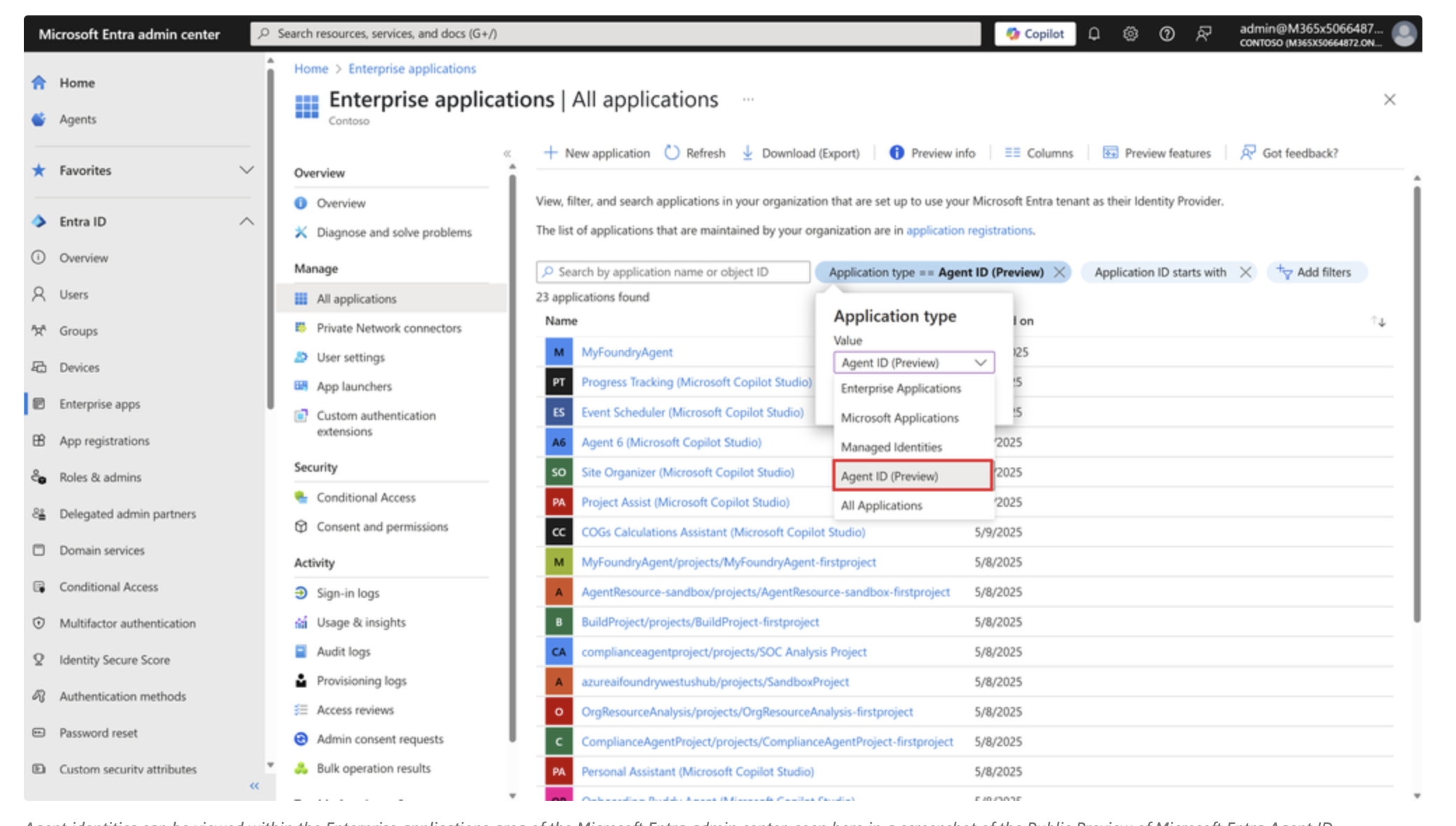
Specifically, what Entra Agent ID introduced was a new application type in the Microsoft Entra admin center called “Agent ID (Preview).” IT administrators navigating to Enterprise Applications can filter the application type dropdown to show only Agent IDs, instantly revealing every AI agent registered in the tenant — whether built by a developer in Azure AI Foundry, created by an information worker in Copilot Studio, or brought in through a partner platform. Critically, agents created in Azure AI Foundry and Copilot Studio appear automatically, with no manual registration step required.
The architecture diagram released alongside the announcement makes the scope clear. Entra Agent ID provides authentication, authorisation, identity protection, access governance, and visibility across agents from Azure AI Foundry, Copilot Studio, Security Copilot, Microsoft 365 Copilot, and third-party tools. ServiceNow and Workday were named specifically as integration partners at launch, with automated provisioning of agent identities for agents that work alongside human employees in those platforms.
From an identity architecture standpoint, the model Microsoft has chosen is worth noting. Rather than creating a parallel identity system for agents, Entra Agent ID introduces a new identity object type called an agent identity, which is a specialised service principal in Microsoft Entra ID. Every agent identity is created from a reusable template called an agent identity blueprint. That blueprint defines the agent’s capabilities, the permissions it may need, and the roles it can take on.
Individual deployed agents inherit from the blueprint and each gets its own scoped agent identity with just the access it actually needs for its assigned tasks. The blueprint model also enables multi-tenant deployments: register the agent once, and it can operate across multiple Entra tenants, each enforcing its own policies, from a single codebase.
The sponsor model is embedded at this identity level, not just at the administrative layer. Every agent identity can have a sponsor: a named human user or group accountable for that agent. That accountability persists in Entra, which means it survives team changes, project handovers, and organisational restructures — exactly the governance gap that creates problems in organisations that deploy agents without formal identity management.
Over the six months following the initial announcement at Build 2025, Microsoft committed to extending Entra Agent ID with richer Conditional Access policies, detailed permission scoping, lifecycle management automation, and expanded auditing. The Microsoft Agent 365 release in May 2026 represents the full realisation of that roadmap, with the Entra identity layer as the foundation everything else is built on.
Security Architecture: How Defender and Purview Fit Into Microsoft Agent 365
Microsoft Agent 365 extends the full Microsoft security stack to cover agents, and each product plays a distinct role.
Microsoft Defender is extended to cover agent security posture. Security teams get visibility into the attack paths that could be created from a compromised or misconfigured agent through to other critical assets in your environment. Agents are included in incident investigation and threat detection as part of the full cyberattack chain, not treated as a separate category that falls outside normal security operations.
Runtime defence is one of the more forward-looking security capabilities here. Agents that process external inputs such as emails, web content, or user-submitted documents are vulnerable to prompt injection attacks where a malicious actor tries to manipulate agent behaviour through crafted content. Microsoft Agent 365 uses AI-powered intelligence to detect and block those attacks in real time, as well as monitor for data exfiltration attempts that might result from risky agent behaviour.
Microsoft Purview governs the data side. As agents create, access, and move content across your organisation, Purview’s sensitivity labels and data classification policies apply. If an agent attempts to interact with data that sits above its authorised access level, that interaction is blocked dynamically. Every agent interaction is logged and auditable, which is particularly important for organisations in regulated industries where AI governance is increasingly a compliance requirement, not just a best practice.
The layered approach across identity (Entra), threat protection (Defender), and data governance (Purview) means Microsoft Agent 365 does not require a separate security model for agents. It extends an architecture that enterprise security teams already understand and operate.
How Microsoft Agent 365 Removes the Friction From AI Adoption at Scale
One of the consistent challenges with enterprise AI programmes is what happens after a successful pilot. A team proves out an agent use case, sees strong results, and then IT, Security, and Legal are asked to sign off on broader rollout. Without a standardised governance framework, every new deployment becomes a separate security review, a separate access scoping exercise, and a separate compliance conversation. That friction compounds quickly and slows adoption significantly.
Microsoft Agent 365 is designed to change that dynamic. Standard policy templates and onboarding guardrails mean IT administrators can define a repeatable pattern for agent deployment rather than evaluating each one from scratch. Organisations that invest in setting up those templates early will find that subsequent agent deployments become progressively faster to approve and go live, because the governance work has already been done at the framework level.
The Agent Store addresses the end-user adoption side. Rather than expecting knowledge workers to seek out, evaluate, and configure agents themselves, the Agent Store surfaces relevant agents for each role inside the Microsoft 365 Copilot and Teams interfaces that people already use all day. Lower discovery friction has a direct and measurable impact on adoption rates.
Performance measurement closes the loop. Business leaders can see which agents are being used, which ones are delivering outcomes, and which ones are sitting idle. That data drives better decisions about where to scale investment and where to course-correct, which is exactly what enterprise AI programmes need to demonstrate sustainable ROI.
What Microsoft Agent 365 Looks Like for Different Stakeholders
Microsoft Agent 365 serves very different needs depending on who is using it, and it is worth thinking through each stakeholder group separately.
IT Administrators
The Microsoft Agent 365 management experience is built directly into the Microsoft 365 Admin Center. There is no new console to learn. IT administrators get a full view of the agent fleet, policy controls for creation and onboarding, sponsor assignment workflows, and the performance dashboards, all from the same place they manage the rest of their Microsoft 365 environment. The Frontier early access programme allows IT to enable Microsoft Agent 365 at the tenant level or limit it to specific user groups for a controlled initial rollout.
Security Teams
Security teams can include agents in their existing security posture management processes without standing up a separate workflow. Agent vulnerabilities, misconfigurations, and risky access paths surface in Defender alongside the broader security exposure view. Incident investigation includes agents as part of the attack chain, and runtime protections operate continuously without requiring a manual security review every time a new agent is deployed.
Business Leaders and AI Champions
Business stakeholders get access to a growing catalogue of governed agents that can automate meaningful work at scale, not just answer questions. The performance metrics and usage data give leadership teams actual evidence to make decisions about where agent investment is paying off and where it is not. For organisations trying to build the business case for continued AI investment, having that data available in a structured, auditable format is genuinely useful.
The Full Technology Stack Inside Microsoft Agent 365
Microsoft Agent 365 extends the following Microsoft products to cover agents as first-class managed entities:
- Microsoft Entra: Identity, Conditional Access, Lifecycle Governance, and Identity Protection for agent identities
- Microsoft Defender: Security posture management, threat detection, vulnerability management, and runtime defence for agents
- Microsoft Purview: Data governance, compliance logging, content safety controls, and sensitivity label enforcement for agent interactions
- Work IQ: Organisational data, context, and relationships to ground agent behaviour in your specific business environment
- Microsoft 365 Apps: Agents can work in Word, Excel, PowerPoint, and Outlook for content creation and collaboration tasks
- Power BI: Agents can generate analytics and dashboards to support data-driven collaboration
- Microsoft 365 Admin Center: The centralised management hub for the full Microsoft Agent 365 experience
The point worth emphasising is that Microsoft Agent 365 is not a new product sitting alongside your existing infrastructure. It is a layer on top of tools your organisation already has operational familiarity with. That has real implications for adoption speed and ongoing operating cost.
Practical Guidance for Enterprise Architects and IT Leaders
If you are working through how to approach Microsoft Agent 365 in your organisation, here are the things I would focus on first.
Get the registry right before you deploy more agents
Resist the urge to start with the exciting part, which is deploying new agents. Start by using the registry to understand what is already running. In most organisations, the shadow agent discovery process will surface agents that IT did not know existed. That inventory is the baseline your governance framework needs to be built on. You cannot write access policies or compliance controls for agents you do not know about.
Make agent identity non-negotiable from day one
No agent should be deployed without a corresponding Entra Agent ID and an assigned sponsor. The sponsor model is particularly important: it creates an accountability chain that persists even when team members change roles or leave the organisation. Treat this the same way you would treat service account governance. The discipline matters.
Build on your existing Conditional Access framework
If your organisation already has mature Conditional Access policies for users and devices, Microsoft Agent 365 allows you to extend those policies to agents without building a separate security framework from scratch. Reuse what works. Your security team already understands these policies and how to manage exceptions and investigations within them.
Define governance policies before you scale, not after
The organisations that get the most from Microsoft Agent 365 are those that use its introduction as a forcing function to define clear policies: who can build agents, what approval process applies, how access is scoped, what data categories are off-limits, and how performance is measured. Microsoft Agent 365 provides the tools; your organisation still needs to define the policies those tools enforce. That policy work is not technical and it is not optional.
Use the Frontier programme to build operational confidence before a full rollout
Microsoft Agent 365 is available through Microsoft’s Frontier early access programme in the Microsoft 365 Admin Center. Enabling it for a specific user group or a defined set of pilot agents is the right approach. Build operational confidence with the tooling, document your patterns, and then expand.
Getting Started with Microsoft Agent 365
Microsoft Agent 365 reached general availability on 1 May 2026 as part of the Microsoft 365 E7: The Frontier Suite. The E7 suite brings together Microsoft 365 E5 for secure productivity, the Entra Suite for identity and access, Microsoft 365 Copilot for AI in the flow of work, and Microsoft Agent 365 as the control plane for governing and scaling agents, all grounded in Work IQ.
IT administrators can access Microsoft Agent 365 today through the Frontier programme in the Microsoft 365 Admin Center. Frontier features can be enabled at the tenant level or scoped to specific users for initial evaluation. Microsoft Entra Agent ID is included in Microsoft Agent 365 and is currently in public preview. Full documentation is available on Microsoft Learn.
Frequently Asked Questions About Microsoft Agent 365
Is Microsoft Agent 365 the same product as Microsoft 365?
No. Microsoft 365 manages your people’s access to productivity tools. Microsoft Agent 365 manages your agents. They are complementary products designed to work together, not two names for the same thing. Microsoft 365 is a prerequisite for many of the Microsoft-native agent scenarios, but they are sold and licensed separately.
Which types of agents does Microsoft Agent 365 support?
Any agent published through Microsoft 365 channels and registered with an Entra Agent ID appears automatically in the Microsoft Agent 365 inventory. Agents built on non-Microsoft frameworks or delivered by third-party platforms can also be registered manually. The partner ecosystem at launch includes Adobe, ServiceNow, Workday, Databricks, NVIDIA, Glean, and others.
Do you need Copilot Studio to use Microsoft Agent 365?
No. Microsoft Agent 365 is framework-agnostic. Agents built in Copilot Studio, Azure AI Foundry, open-source frameworks, or through partner platforms are all manageable through the same control plane. Copilot Studio remains the recommended low-code path for building agents within the Microsoft ecosystem, but it is not required for Microsoft Agent 365 governance.
How does Microsoft Agent 365 handle prompt injection?
Agents that process external inputs are vulnerable to prompt injection attacks, where malicious content is crafted to manipulate agent behaviour. Microsoft Agent 365 uses AI-powered runtime detection to identify and block these attacks continuously, without requiring manual configuration for each agent deployment.
What licensing does Microsoft Agent 365 require?
Microsoft Agent 365 is generally available as part of the Microsoft 365 E7: The Frontier Suite from 1 May 2026. It is a separate licence from Microsoft 365. For specific licensing details and pricing relevant to your organisation, speak with your Microsoft account team or partner. Early access through the Frontier programme is available now in the Microsoft 365 Admin Center.
Where Microsoft Agent 365 Fits in Your AI Architecture Conversation
Governance and fast AI adoption are often talked about as if they are in tension with each other. They are not. Organisations that skip the governance layer do not move faster. They move faster for a short window and then hit compliance incidents, shadow agent problems, and security reviews that slow everything down retroactively. Getting the management plane in place first is what makes confident, accelerated adoption actually possible.
Microsoft Agent 365 is architecturally coherent in a way that matters for enterprise adoption. It does not ask your organisation to learn a new management model or operate a separate security framework for agents. It extends the tools your IT and security teams already know, which means you can stand it up without a long enablement runway and without a steep skills investment.
If your organisation is actively deploying agents today or planning to do so in the next six to twelve months, Microsoft Agent 365 belongs in your architecture conversations now, before the agent fleet grows to a size where retroactive governance becomes genuinely painful to implement.
References and Further Reading
- Announcing Microsoft Entra Agent ID: Secure and Manage Your AI Agents (Microsoft Entra Blog, May 2025)
- What is Microsoft Entra Agent ID? (Microsoft Learn)
- Microsoft Agent 365 — Official Product Page
- Microsoft Entra Agent ID — Public Preview
- Microsoft Ignite 2025 — Copilot Control System and Agent 365 Announcement (Microsoft Tech Community)
- Microsoft Ignite 2025: Copilot and Agents Built to Power the Frontier Firm (Microsoft 365 Blog)
- Accelerating Frontier Transformation with Microsoft Partners (Microsoft Blog, April 2026)
- KPMG Q3 2025 AI Quarterly Pulse Survey — Official Press Release
- Gartner: 40% of Enterprise Apps Will Feature Task-Specific AI Agents by 2026
- Gartner: Over 40% of Agentic AI Projects Will Be Canceled by End of 2027
- Gartner Top Strategic Predictions for 2026 and Beyond
- Forrester Predictions 2026: AI Agents and Enterprise Software
- CIO Dive: 5 CIO Predictions for AI in 2026
- Microsoft Learn — Security Documentation
Want to explore how Microsoft Copilot and agentic AI connect to your broader Microsoft 365 strategy? The Copilot category on My Tech Space has practical, architecture-focused posts covering Copilot Studio, agent deployment, and governance across the Microsoft 365 platform.
One thought on “Microsoft Agent 365: The Essential Enterprise Guide to AI Agent Governance”