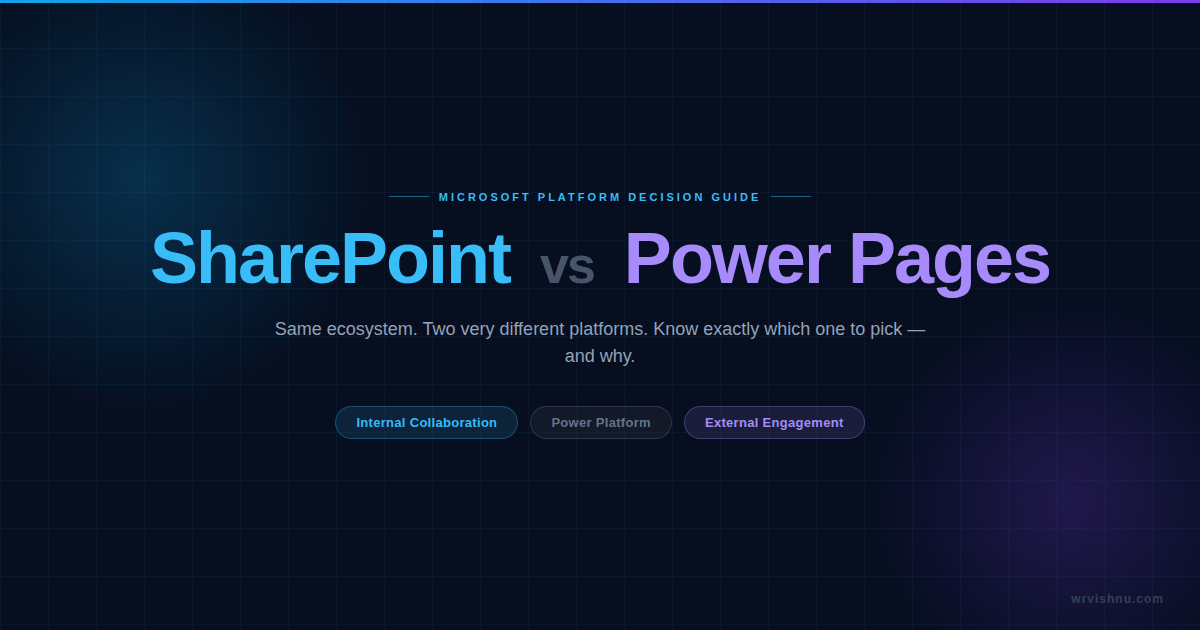
I get this question more than almost any other. A client shares a brief, I ask a few questions, and within five minutes it’s clear they’ve already mentally committed to the wrong platform. Sometimes it’s SharePoint being stretched to serve external customers. Sometimes it’s Power Pages being proposed for an internal HR portal when SharePoint is sitting right there in their M365 tenant, fully licensed. Both mistakes are expensive — and entirely avoidable. This Power Pages vs SharePoint guide is the exact decision framework I run through on every single engagement — laid out as plainly as I can.
The one question that actually matters
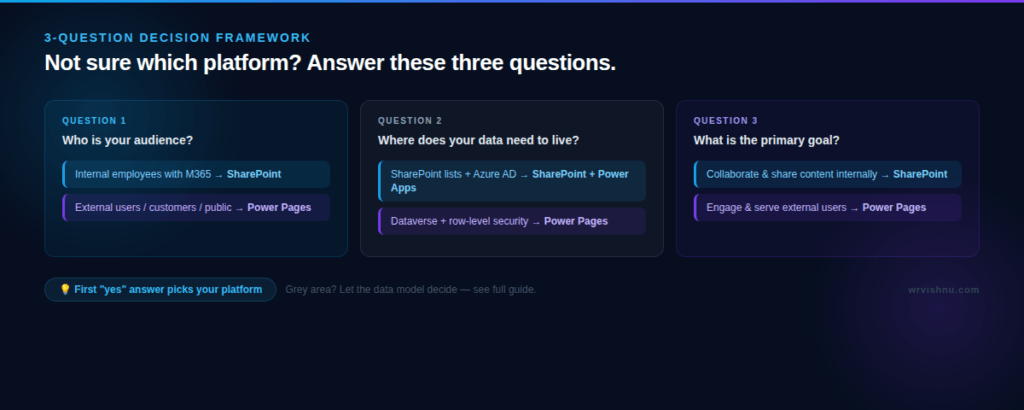
Forget features for a moment. Forget licensing, architecture, and whether you prefer lists or Dataverse. Before any of that — ask this: Who is your audience?
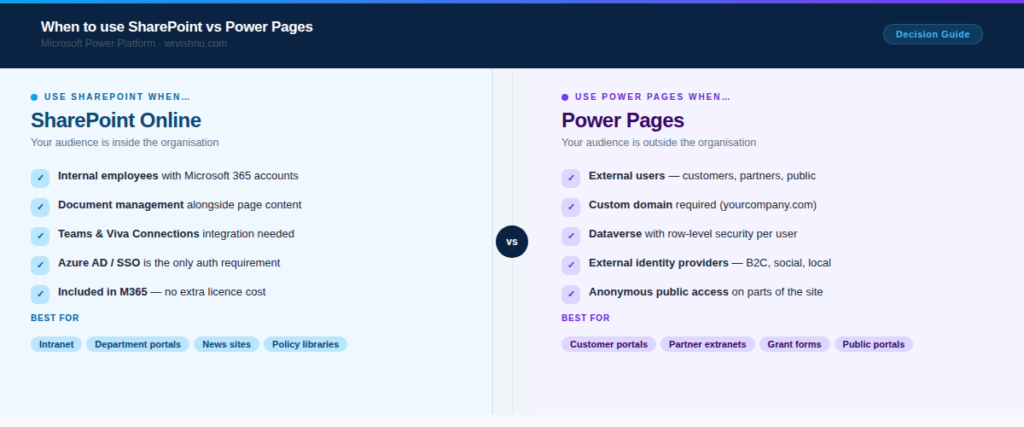
- People inside your organisation with Microsoft 365 accounts → SharePoint
- Anyone outside — customers, partners, suppliers, the public → Power Pages
That one answer resolves about 80% of Power Pages vs SharePoint decisions. The remaining 20% comes down to data, security, and budget — and I’ll walk through all three. But if you take nothing else from this post, take that. If you’re also evaluating where AI fits into your Microsoft stack, the Copilot guides on this site are worth a read alongside this.
What SharePoint Online is actually built for
SharePoint Online is Microsoft’s internal collaboration and content management platform. It’s included in every Microsoft 365 subscription — E1, E3, E5, Business plans, all of them. Most enterprise organisations are already running on it whether they realise it or not, because it’s the backbone behind Teams file storage, OneDrive, and the M365 intranet. You can read the official SharePoint Online overview on Microsoft Learn for the full platform breakdown.
The design assumption baked into SharePoint is simple: your users already have Azure AD identities. They log in with their corporate account, they get access to what they’re supposed to see, and the security model handles itself. There’s no extra licence to buy, no separate platform to maintain. It’s just there.
Where SharePoint genuinely shines
- Document management: Libraries, version history, co-authoring — content and files in one place with no duct tape required.
- M365 integration: Teams, Viva Connections, Power Automate, Microsoft Search — all connected out of the box with zero extra configuration.
- Non-technical editors: Business users can build and update SharePoint pages themselves without touching code.
- Licensing: Already paid for. Zero add-ons. This matters more than people admit when budgets are tight.
- Governance: Microsoft Purview, sensitivity labels, and compliance tools apply natively across every SharePoint site.
If your requirement is a SharePoint Online intranet portal for internal employees, you’re almost certainly in the right place. Don’t overcomplicate it. You’ll find more hands-on guides across the Power Platform category on this site, including SharePoint governance and SPFx solutions.
What Microsoft Power Pages is actually built for
Microsoft Power Pages — previously called Power Apps Portals before the 2022 rebrand — is the low-code platform in the Power Platform family for building external-facing web portals. The key word is external. It’s purpose-built for when you need to serve people who don’t have accounts in your Azure AD tenant and never will. Microsoft describes it as a platform for secure, enterprise-grade external business websites — the full detail is in the official Power Pages documentation on Microsoft Learn.
Data in Power Pages lives in Dataverse, not SharePoint lists. That’s not just a technical detail — it changes everything about how security, data modelling, and user access work. Dataverse gives you row-level security, relational data structures, and the ability to show different users different records based on who they are. That’s something SharePoint simply wasn’t built to do at scale for external users.
Where Power Pages is the right call
- External identity support: Azure AD B2C, LinkedIn, Google, local accounts — not just corporate SSO. Real external users need real external identity options.
- Row-level security: Each user sees only their own data, driven by Dataverse table permissions and web roles — this is what makes Power Pages Dataverse external users work securely at scale.
- Custom domains: yourcompany.com instead of tenant.sharepoint.com. For any Microsoft Power Pages customer portal, this is non-negotiable.
- Complex forms: Multi-step, conditional logic, file upload, Dataverse write-back — all first-class features, not afterthoughts.
- Anonymous access: Parts of the portal can be completely public with no login required — something SharePoint can’t cleanly support for external users.
- Power Platform native: Power Automate, Power Apps, and Dataverse all connect natively without additional connectors or glue code.
Power Pages vs SharePoint: 7 proven ways to decide
Here’s the Power Pages vs SharePoint framework I walk clients through. Go down both lists — the first clear “yes” tells you which platform to build on.
1. Your audience is internal — choose SharePoint
If every person who will ever use this site is an employee with a Microsoft 365 account and an Azure AD identity, SharePoint is your platform. It was purpose-built for exactly this scenario. There’s no benefit to adding Power Pages into the mix — you’d be paying for capability you don’t need and adding Power Pages licensing cost for zero return.
2. External users are in scope — choose Power Pages
The moment a customer, partner, supplier, contractor, or member of the public needs to access the site, you’re in Power Pages territory. SharePoint’s external sharing works for occasional guest access — it was never designed as a proper customer portal. When to use Microsoft Power Pages is clear: any time the word “external” appears in your requirements document.
3. You need a custom domain — choose Power Pages
SharePoint pages live under tenant.sharepoint.com. Full stop. Power Pages supports custom domains — your portal can sit at portal.yourcompany.com or support.yourcompany.com. For any SharePoint vs Power Pages external portal decision where a branded URL matters to your customers, Power Pages wins that argument every time.
4. Data lives in Dataverse — choose Power Pages
If the data powering the site is in Dataverse — or needs to be there because of relational structure or row-level security — Power Pages is the natural home. Connecting SharePoint to Dataverse is possible but clunky. If your data model is Dataverse, your portal should be Power Pages. The Power Platform articles on this site cover Dataverse architecture in more detail if you’re still working out the data model.
5. Budget has no room for add-ons — choose SharePoint
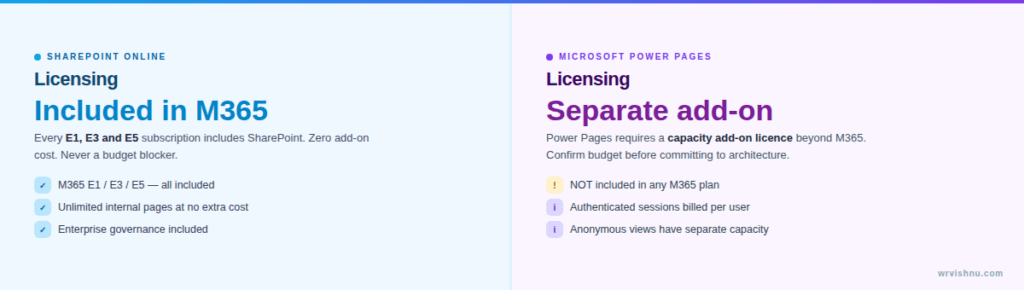
SharePoint is included in every M365 E1, E3, and E5 subscription. Power Pages licensing cost is a separate line item — more on that in the section below. If you’re operating within a fixed Microsoft 365 budget with no room for additional Power Platform licensing, SharePoint is the financially sound answer for any internal use case.
6. Teams or Viva Connections integration is required — choose SharePoint
SharePoint is the content layer that powers Viva Connections and surfaces directly inside Microsoft Teams. If your intranet needs to appear inside the Teams experience your employees already live in, SharePoint is the only sensible choice. Power Pages has no native integration with Teams or Viva — full stop.
7. The site must feel like a public website — choose Power Pages
If external customers are going to land on this portal, it needs to feel like a product — not a corporate intranet. Power Pages gives you full design control, anonymous access, a custom domain, and a user experience that doesn’t scream “SharePoint” to everyone who visits. When the Microsoft Power Pages customer portal experience matters to your brand, that’s your answer.
The grey area nobody talks about
IT service desk portals. HR request forms. Internal self-service tools. These are the grey-area scenarios in every Power Pages vs SharePoint conversation — they generate the longest debates in architecture calls, and honestly — both platforms could work. So how do you break the tie?
My tiebreaker: where does the data need to live?
If the data stays in SharePoint lists and every user has an Azure AD identity, build it on SharePoint with an embedded Power App for the form experience. You get everything you need and spend nothing extra on licensing.
But if the data model is relational, if you need different staff seeing different queues, or if external access is even a possibility on the roadmap — go Power Pages from day one. I’ve seen teams spend three months building on SharePoint and then start over because “we’ve just decided to open it to contractors.” That’s a painful and avoidable conversation. Don’t have it.
Power Pages licensing cost vs SharePoint — what nobody says early enough
This is the detail that usually surfaces around sprint four, when procurement asks what this new platform actually costs. The complete breakdown is in Microsoft’s official Power Pages licensing FAQ, but here’s the plain version.
Power Pages requires a separate licence. Either the Power Pages capacity add-on — billed per authenticated user session — or a per-user licence for authenticated portal users. Anonymous page views run on their own capacity model on top of that. The Power Pages licensing cost is not trivial at scale, and it’s a cost that simply doesn’t exist with SharePoint.
SharePoint pages are included in every Microsoft 365 E1, E3, and E5 licence. Nothing extra. Already paid for.
In government and public sector work especially, Power Pages licensing cost is often the deciding factor before a whiteboard is even opened. If you’re building a portal for 50,000 citizens, that capacity cost needs to be a line item in the business case — not a surprise in month six. Get that number in front of your stakeholders early. For broader Power Platform cost context, browse the Power Platform articles on this site.
Real-world scenarios — Power Pages vs SharePoint in practice
SharePoint Online intranet portal use cases
- Company intranet and internal news hub
- Department portals — HR, Finance, IT
- Policy and procedure libraries with document versioning
- Project collaboration sites connected to Teams
- Internal knowledge bases and learning hubs
- Organisation-wide communication and announcement sites
Microsoft Power Pages external portal use cases
- Microsoft Power Pages customer portal for support and case submission
- Supplier or vendor registration portals
- Government grant and application submission portals
- Partner extranets with row-level Dataverse access
- Public-facing service request forms with anonymous access
- External event registration and attendee management
Power Pages vs SharePoint — side-by-side comparison
| Criteria | SharePoint Online | Microsoft Power Pages |
|---|---|---|
| Primary audience | Internal employees | External users — customers, partners, public |
| Authentication | Azure AD / corporate SSO | Azure AD B2C, social logins, MFA, local accounts |
| Data storage | SharePoint lists and document libraries | Dataverse — relational, row-level security |
| Custom domain | No — tenant.sharepoint.com | Yes — yourcompany.com |
| Anonymous access | Limited — guest accounts only | Yes — configurable per page |
| Row-level security | Permission-based at item level | Native Dataverse table permissions and web roles |
| Licensing | Included in M365 E1/E3/E5 | Separate Power Pages capacity add-on required |
| No-code editing | Strong — native editor for business users | Moderate — Design Studio needs more technical depth |
| Power Platform integration | Via connectors and embedded Power Apps | Native — Dataverse, Power Automate, Power Apps |
| Teams / Viva integration | Native — Viva Connections, Teams tabs | Not supported natively |
My honest take on Power Pages vs SharePoint after working with both
These two platforms are not fighting each other. They solve different halves of the same problem. SharePoint is your internal digital workplace backbone. Power Pages is the front door you open to the outside world. Once you understand that framing, the Power Pages vs SharePoint decision usually becomes obvious very quickly.
The mistake I see most — and I’ve seen it a lot across enterprise and government clients — is using SharePoint for external portals because it’s already licensed. You end up with a clunky user experience, a domain that makes customers feel like they’ve landed on someone’s intranet, and a security model that was never designed for what you’re asking it to do.
The opposite mistake is less common but just as costly: building an internal tool on Power Pages when SharePoint is already there, fully licensed, already integrated with Teams. You’ve added Power Pages licensing cost and architectural complexity for no real gain.
Get the audience question right first. Everything else in the Power Pages vs SharePoint decision follows naturally from there.
Frequently asked questions about Power Pages vs SharePoint
Can Power Pages replace SharePoint for an intranet?
Technically you could set it up that way. Practically, you’d lose native document management, Teams integration, Viva Connections, and Microsoft Search — while paying for a Power Pages licence you didn’t need. For internal audiences on a SharePoint Online intranet portal, SharePoint wins every single time.
Can SharePoint serve external users?
It has an external sharing feature via guest accounts in your Azure AD tenant. But it doesn’t support anonymous public access cleanly, can’t run on a custom domain, and wasn’t designed for the row-level security that real SharePoint vs Power Pages external portal scenarios demand. It works as a short-term workaround. It doesn’t work as a proper external portal.
Is Power Pages part of Microsoft 365?
No. Power Pages is part of the Microsoft Power Platform, which integrates with Microsoft 365 but is licensed separately. The Power Pages licensing cost is not included in any M365 E1, E3, or E5 plan.
What is the difference between Power Pages and Power Apps Portals?
Same product, new name. Microsoft rebranded Power Apps Portals to Power Pages in 2022, introduced the Design Studio, and cleaned up the licensing model. If you’ve built on Power Apps Portals before, the Power Pages Dataverse external users model will feel very familiar — the fundamentals haven’t changed.
When should you use Power Pages instead of SharePoint with embedded Power Apps?
Use Power Pages when external users need access, when data must live in Dataverse with row-level security, or when the experience needs a custom domain and a proper website feel. Use SharePoint with embedded Power Apps when your audience is fully internal and the data model is straightforward SharePoint lists. When to use Microsoft Power Pages vs the embedded approach always comes down to those three factors: audience, data, and domain.
Got a use case you’re still not sure about? Drop it in the comments — I read every one and I’m happy to help you work through the Power Pages vs SharePoint decision.
If this was useful, these are worth your time too: