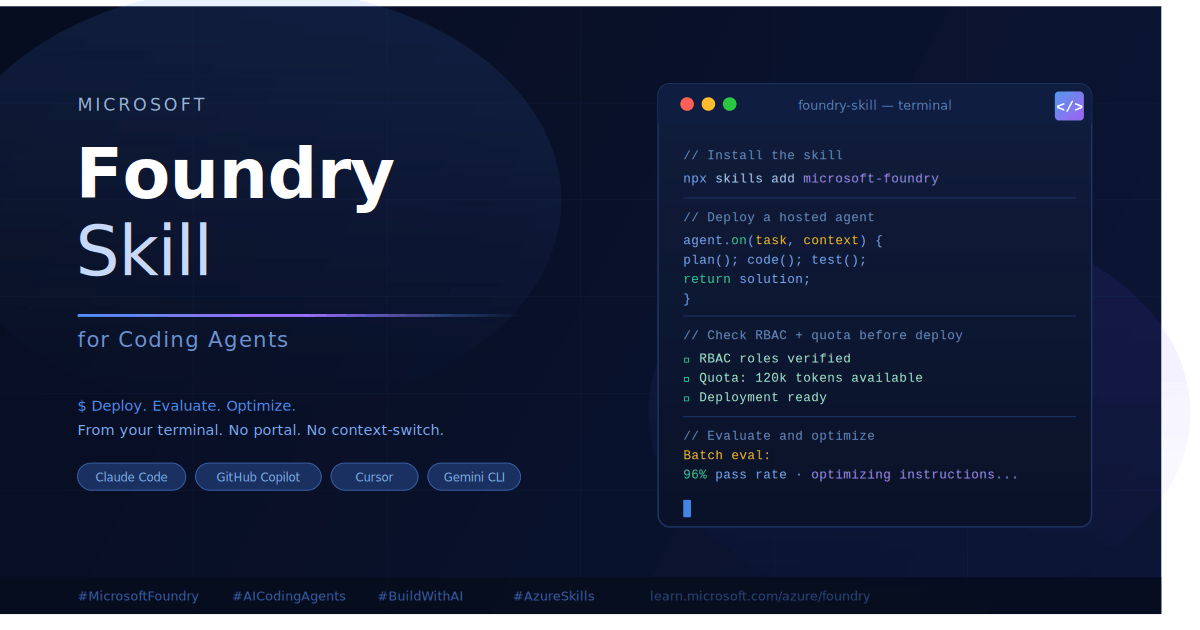
If you spend a lot of time switching between your terminal and the Azure portal just to deploy or test an agent, you already know how much that back-and-forth slows things down. Microsoft changed that with the Microsoft Foundry Skill for Coding Agents — a plugin that lets your coding agent handle Azure Foundry work right where you already are, without touching a browser.
This Foundry agent skill setup guide covers what it is, how to get it running, and what the Microsoft Foundry Skill for Coding Agents can actually do — based on the official Microsoft documentation and the azure-skills GitHub repository.
If you are new to agentic AI development on Azure, you may also want to read our introduction to Azure AI Foundry and Copilot Studio before diving in.
What Is the Microsoft Foundry Skill for Coding Agents?
The Microsoft Foundry Skill for Coding Agents is part of the Azure Skills Plugin — an open-source plugin published by Microsoft that brings Azure expertise directly into your coding agent. Think of it as teaching your AI assistant the exact steps needed to work with Azure Foundry: from setting up a project and deploying a model, all the way to running evaluations and troubleshooting failures.
The core of this plugin is a SKILL.md file. The Microsoft Foundry SKILL.md coding agent reads this file to understand Azure Foundry workflows — loading its contents as additional session instructions so the agent gives specific, repeatable guidance without bloating the context window.
Once installed, the Microsoft Foundry Skill for Coding Agents lets your agent scaffold new hosted agents, check your RBAC permissions before a deployment, run batch evaluations, pull traces from production, and fix broken deployments — all from a simple natural-language prompt in your terminal or IDE.
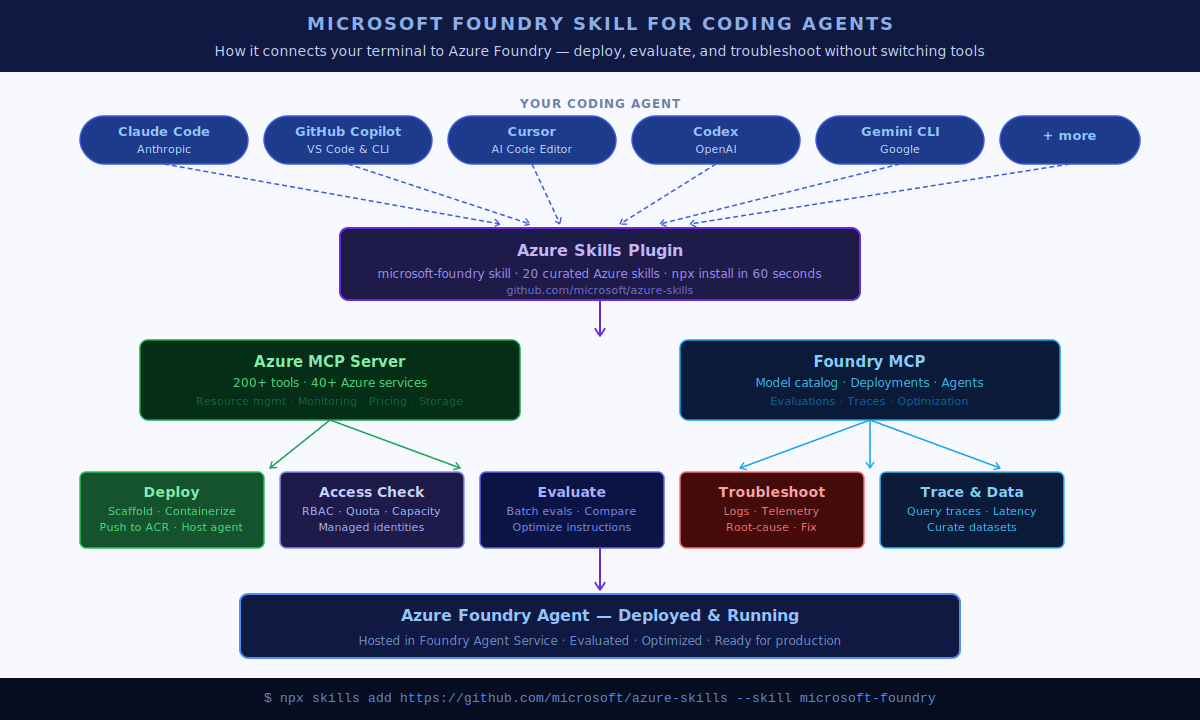
It works with tools developers already use every day: GitHub Copilot in VS Code, Copilot CLI, Claude Code, Cursor, Codex, and Gemini CLI. The GitHub Copilot Azure Foundry combination is one of the most common deployment patterns — install the plugin once and your Copilot agent gains full Foundry workflow intelligence immediately.
One install, three layers: the azure-skills plugin gives you curated Azure skills, the Azure MCP Server with 200+ tools across 40+ services, and Foundry MCP for AI-specific workflows like model discovery and agent deployment.
5 Problems the Microsoft Foundry Skill for Coding Agents Solves
Before this skill existed, the typical Azure Foundry workflow meant writing code in your editor, switching to a browser to check the Azure portal, manually verifying quota and RBAC settings, running a CLI command, checking logs in the portal, and repeating. Functional, but slow and error-prone.
The Microsoft Foundry Skill for Coding Agents collapses that loop. Here is what it handles directly inside your coding agent:
- Scaffold and deploy a hosted agent with one prompt — no manual portal configuration
- Run batch evaluations and optimize agent instructions — compare versions and improve prompts based on real results
- Build evaluation datasets from production traces — query recent trace data and turn it into structured test sets
- Troubleshoot deployment failures with guided root-cause analysis — the agent inspects logs, queries telemetry, and suggests a repair plan
- Check RBAC, quotas, and capacity before you deploy — catch blockers before they cost you time
Prerequisites Before Installing the Microsoft Foundry Skill for Coding Agents
Before you run the install command, make sure you have the following in place. Missing any of these is the most common reason the Microsoft Foundry Skill for Coding Agents does not work after installation.
- An active Azure subscription (free account available)
- Node.js 18 or later on your PATH — the plugin uses
npxto start MCP servers - Git installed — required so the host can download plugin and skill content
- Azure CLI installed and authenticated — run
az login - Azure Developer CLI (azd) if you plan to use deployment workflows — run
azd auth login - A compatible coding agent host: VS Code with GitHub Copilot, Copilot CLI, or Claude Code
How to Install the Microsoft Foundry Skill for Coding Agents: 4 Options
Option 1: Install via VS Code (Recommended)
If you use Visual Studio Code, the easiest path is the Foundry Toolkit extension. It comes with the Microsoft Foundry Skill for Coding Agents already bundled. After you install and reload VS Code, open Copilot Chat, switch to agent mode, and sign in with your Azure account. The skill is ready immediately.
You can also install the Azure MCP Extension directly from the Visual Studio Marketplace.
Option 2: Install via Claude Code
# Step 1: Add the Microsoft marketplace (first time only)
claude plugin marketplace add microsoft/azure-skills

# Step 2: Install the plugin
claude plugin install azure@azure-skills

# To update later
claude plugin update azure@azure-skills
Option 3: Install via Copilot CLI
# Step 1: Add the marketplace (first time only)
/plugin marketplace add microsoft/azure-skills

# Step 2: Install the plugin
/plugin install azure@azure-skills
Option 4: Install Only the Foundry Skill
If your agent host already has its own MCP server configuration and you only need the Microsoft Foundry Skill for Coding Agents content itself:
npx skills add https://github.com/microsoft/azure-skills --skill microsoft-foundryHow to Verify the Microsoft Foundry Skill for Coding Agents Is Working
After installation, run these 3 quick checks. Each tests a different layer of the plugin.
Check 1 — Verify the skills layer
Ask your agent: “What Azure services would I need to deploy this project?” You should get structured Azure guidance, not a generic cloud answer.
Check 2 — Verify the Azure MCP connection
Ask your agent: “List my Azure resource groups.” The response should pull real data from your Azure account using live MCP tools.
Check 3 — Verify the Foundry MCP connection
Ask your agent: “What AI models are available in Microsoft Foundry?” You should get a Foundry-backed response rather than a generic model summary.
If a check fails: Reload your host, confirm the plugin installed correctly, and re-run
az loginto make sure your authenticated subscription matches where your Foundry resources live.
10 Capability Areas of the Microsoft Foundry Skill for Coding Agents
The microsoft-foundry skill is a meta skill — it routes your requests to the right sub-skill automatically. You do not need to name any sub-skill. Just describe the outcome you want.
| Capability Area | What the Skill Helps the Agent Do |
|---|---|
| Foundry Onboarding | Create or connect to a Foundry project, provision resources, choose public or network-isolated setup |
| Access and Capacity | Check RBAC assignments, managed identities, quota, model availability, and deployment prerequisites |
| Model Deployment | Deploy models with quick presets or custom settings (version, SKU, capacity, responsible AI config) |
| Model Customization | Fine-tune with supervised fine-tuning, direct preference optimization, or reinforcement fine-tuning |
| Agent Creation | Create hosted agents using Microsoft Agent Framework, LangGraph, or custom Python/C# frameworks |
| Agent Deployment | Containerize, push to Azure Container Registry, create or update hosted agent deployments |
| Invocation and Testing | Send single-turn or multi-turn messages to deployed agents, test HTTP and WebSocket protocols |
| Evaluation and Optimization | Run batch evaluations, compare versions, optimize prompts, improve agent instructions |
| Trace and Dataset Work | Query traces, analyze latency and failures, curate evaluation datasets from production traces |
| Troubleshooting | Inspect logs, query telemetry, diagnose failures, plan a repair-and-redeploy loop |
Practical Prompts to Use with the Microsoft Foundry Skill for Coding Agents
These prompt patterns come straight from the official documentation and cover the most common developer workflows with the Microsoft Foundry Skill for Coding Agents.
| Goal | Example Prompt |
|---|---|
| Set up a new Foundry project | “Use the Microsoft Foundry Skill to create a public Foundry project, deploy a model, and scaffold a hosted agent.” |
| Deploy an existing hosted agent | “Use the Microsoft Foundry Skill to prepare this hosted agent for deployment to my dev environment.” |
| Redeploy after code changes | “Use the Microsoft Foundry Skill to redeploy this agent and verify it still responds correctly.” |
| Test an agent | “Use the Microsoft Foundry Skill to invoke this agent with a short multi-turn test conversation.” |
| Evaluate quality | “Use the Microsoft Foundry Skill to create an evaluation plan for this agent from eval.yaml.” |
| Optimize agent instructions | “Use the Microsoft Foundry Skill to improve the agent instructions based on recent evaluation results.” |
| Build a test dataset from traces | “Use the Microsoft Foundry Skill to create an evaluation dataset from the last seven days of production traces.” |
| Troubleshoot a broken deployment | “Use the Microsoft Foundry Skill to troubleshoot why this hosted agent deployment is failing.” |
| Check access and quota | “Use the Microsoft Foundry Skill to check RBAC and quota blockers before I deploy this model.” |
| Plan a fine-tuning workflow | “Use the Microsoft Foundry Skill to plan a supervised fine-tuning workflow for this training dataset.” |
Workspace Files the Microsoft Foundry Skill for Coding Agents Reads
The Microsoft Foundry Skill for Coding Agents does not just follow prompts — it also reads specific files in your workspace to understand context before making recommendations. Keeping these files current means the agent gives specific, repeatable guidance rather than generic advice.
- azure.yaml — finds azd services, agent folders, and environment bindings
- .azure/<environment>/.env — resolves authenticated azd values like subscription, resource group, project endpoint, and registry
- .foundry/agent-metadata.yaml — stores Foundry-specific state like evaluation suite references and dataset paths
- agent.yaml — provides local agent configuration for create, deploy, invoke, and evaluation workflows
- eval.yaml — defines evaluation intent: dataset file, evaluator names, pass threshold, sample count
Good practice: Use
.foundry/agent-metadata.yamlfor non-secret overlay state. Never store secrets in.foundryfiles. If azd already provides a value like a project endpoint or registry, let the agent read it from there.
2 Agent Types Supported by the Microsoft Foundry Skill for Coding Agents
- Prompt agent — an LLM-backed agent that uses a model deployment and prompt configuration. This is the simpler type and the easiest to get started with.
- Hosted agent — a container-based agent that runs custom code in Foundry Agent Service. Supports the
responses,invocations, andinvocations_wsprotocols. The WebSocket protocol is specifically for real-time scenarios like voice agents or streaming interactions.
Common Troubleshooting Issues
| Issue | Fix |
|---|---|
| Host does not find the skill after install | Reload or restart the host so it re-indexes plugin content |
| MCP tools do not appear | Confirm Node.js is installed, npx works, and Azure/Foundry MCP server entries were added |
| Azure requests fail with auth errors | Run az login again; also run azd auth login for deployment scenarios |
| Agent uses the wrong subscription | Set the intended subscription in Azure CLI before retrying |
| Foundry project operations fail | Confirm your account has the required Azure RBAC roles for the Foundry project |
GEO: Using the Microsoft Foundry Skill for Coding Agents Across 6 Azure Regions
The Microsoft Foundry Skill for Coding Agents works with any Azure subscription regardless of where you are based. The install command is identical everywhere. The Azure MCP Server automatically picks up your authenticated subscription’s region context — you configure nothing region-specific in the plugin itself.
Model quota and capacity vary by region. Before you deploy, always run this check first:
"Use the Microsoft Foundry Skill to check RBAC and quota blockers before I deploy this model."🇺🇸 United States — East US / West US 2
Best model availability and highest default quota. Recommended first choice for new Foundry projects.
🇬🇧 United Kingdom — UK South
Strong coverage for enterprise teams with UK data residency requirements. The built-in RBAC check is particularly useful here.
🇸🇬 Singapore — Southeast Asia
Available Azure Foundry region serving Southeast Asia. Certain high-capacity model SKUs may have lower default quota compared to US regions.
🇦🇺 Australia — Australia East
Fully supported. Useful for teams with Australian data sovereignty requirements. No region-specific configuration needed.
🇮🇳 India — Central India
Available region with a fast-growing Azure developer community. Model availability is expanding rapidly.
🇨🇦 Canada — Canada Central
Supported region with strong enterprise Azure adoption. The RBAC and quota checks are especially helpful before deploying regulated workloads.
Why the Microsoft Foundry Skill for Coding Agents Is Worth Installing Today
Microsoft is not just adding another CLI tool here — they are embedding the workflow knowledge of Azure directly into the agent. The Microsoft Foundry Skill for Coding Agents knows when to check RBAC before deploying, when to verify quota before a model deployment, and how to correlate evaluation results with production traces.
For teams already using Claude Code, GitHub Copilot, or similar tools daily, the Microsoft Foundry Skill for Coding Agents means your agent starts making better Azure decisions out of the box — without prompt-engineering the entire workflow from scratch every time.
The GitHub repository has 423 stars and is actively maintained by Microsoft. The plugin ships 20 curated Azure skills and connects to over 200 structured tools across 40+ Azure services. That is significant coverage for a 60-second install.
Official Resources
- Microsoft Docs: Use the Microsoft Foundry Skill in coding agents
- GitHub: microsoft/azure-skills
- Azure MCP Extension for VS Code
- Quickstart: Deploy Your First Hosted Agent
- Get Started with Foundry MCP Server
Final Thoughts
If you work with Azure Foundry and already use a coding agent as part of your workflow, installing the Microsoft Foundry Skill for Coding Agents takes about 60 seconds. The upside — being able to deploy, test, troubleshoot, and evaluate agents without leaving your terminal — is significant enough to try immediately.
Give the Microsoft Foundry Skill for Coding Agents a try and see how much of your Azure portal time it eliminates.
Frequently Asked Questions
What is the Microsoft Foundry Skill for Coding Agents?
The Microsoft Foundry Skill for Coding Agents is an open-source plugin published by Microsoft that adds Azure Foundry workflow intelligence to coding agents like Claude Code, GitHub Copilot, Cursor, and Gemini CLI. It lets developers deploy, evaluate, and troubleshoot Azure Foundry Agents directly from their terminal without switching to the Azure portal.
How do I install the Microsoft Foundry Skill for Coding Agents?
You can install it in 4 ways: via the Foundry Toolkit extension in VS Code, via Claude Code using claude plugin install azure@azure-skills, via Copilot CLI using /plugin install azure@azure-skills, or using npx with npx skills add https://github.com/microsoft/azure-skills --skill microsoft-foundry. Node.js 18+, Git, and Azure CLI are required before installation.
Does the Microsoft Foundry Skill for Coding Agents work with Claude Code?
Yes. Claude Code is one of the officially supported coding agent hosts. After adding the Microsoft marketplace with claude plugin marketplace add microsoft/azure-skills and running claude plugin install azure@azure-skills, the skill is fully available inside Claude Code.
Is the Microsoft Foundry Skill for Coding Agents free?
Yes. The azure-skills plugin and the Microsoft Foundry Skill are open-source and free to install. You will need an active Azure subscription to use the Azure resources the skill connects to, but the plugin itself has no cost.
Does the Microsoft Foundry Skill for Coding Agents work outside the United States?
Yes. It works with any Azure subscription regardless of your location — including Southeast Asia (Singapore), UK South, Australia East, Central India, Canada Central, and all US regions. The install command is the same everywhere. Model quota may vary by region, so run a quota check before deploying.
What coding agents are compatible with the Microsoft Foundry Skill?
The Microsoft Foundry Skill for Coding Agents works with GitHub Copilot in VS Code, Copilot CLI, Claude Code, Cursor, Codex, and Gemini CLI. Any coding agent host that supports the skills plugin format is compatible.