Managing internal services across disconnected systems is one of the most frustrating things employees deal with every day. You log into one portal to apply for leave, open a completely separate link to raise an IT ticket, then hunt down yet another application to submit a travel claim. Each of these tools works in isolation, and none of them feel like they belong together. The result is wasted time, low adoption, and a workforce that eventually stops using the tools altogether.
This post walks through how to build a Microsoft 365 digital employee hub that brings every internal service into a single, unified experience deployed right inside the tools your teams already use every day. The full digital employee hub project is open-source and available on GitHub, with support for both SharePoint Framework (SPFx) and Power Apps Code Apps deployments.
This project comes from hands-on delivery work across enterprise and government Microsoft 365 environments. The architecture decisions, the choice of SharePoint Lists as the backend, the role assignment approach, and the PowerShell provisioning script all reflect patterns that have been tested in real tenant deployments rather than theory. Everything in this guide is based on what actually works in production.
Why a Microsoft 365 Digital Employee Hub Changes Everything
The core problem with most enterprise intranets is not the content, it is the architecture. Services are added over time by different teams, each with its own URL, its own login prompt, and its own interface conventions. From an employee perspective, every new tool feels like extra friction rather than extra capability.
A Microsoft 365 digital employee hub approaches this differently. Instead of asking employees to learn where things live, you build a single surface that adapts to who they are and what they need. The digital employee hub reads the signed-in user’s role from a SharePoint list and their pending actions, then surfaces exactly the right tools without clutter.
For hybrid and distributed teams, this matters even more. When someone is travelling and needs to log an expense or check their leave balance, they should be able to do that from their phone in under a minute. A fragmented tool landscape makes that nearly impossible, which is exactly the problem this Microsoft 365 digital employee hub is designed to solve.
Two Deployment Options Built on a Shared Foundation
One of the most practical design decisions in this digital employee hub project is that it supports two distinct deployment paths, both drawing from the same React-based codebase. You get the same polished, role-aware experience regardless of which path you take.
SPFx Web Part for SharePoint and Teams
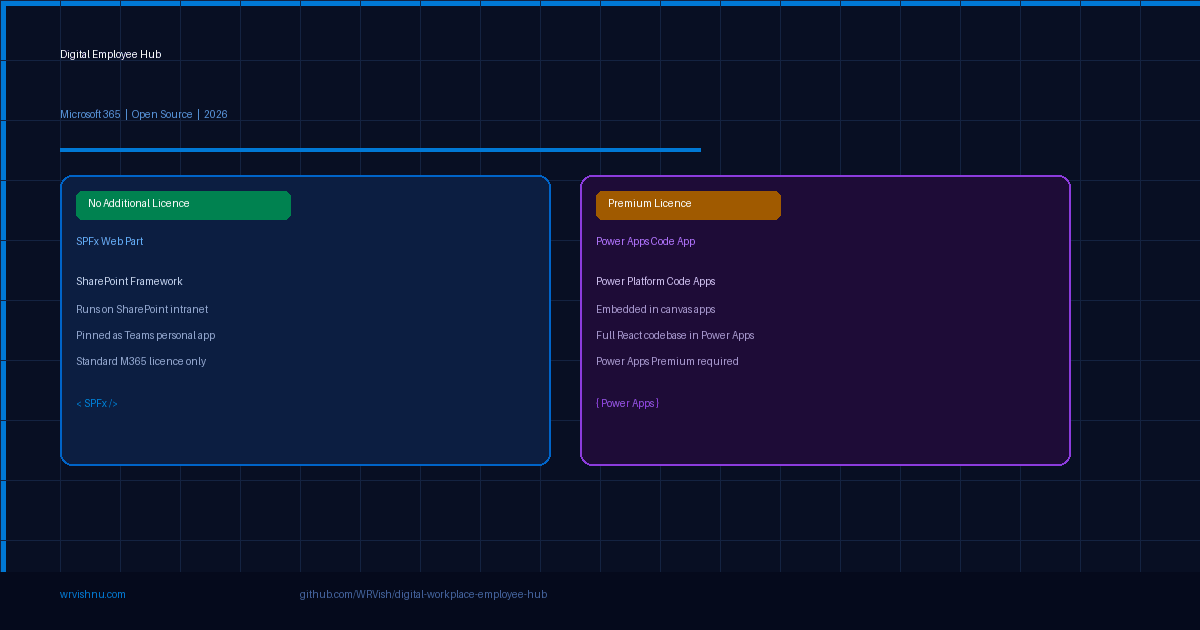
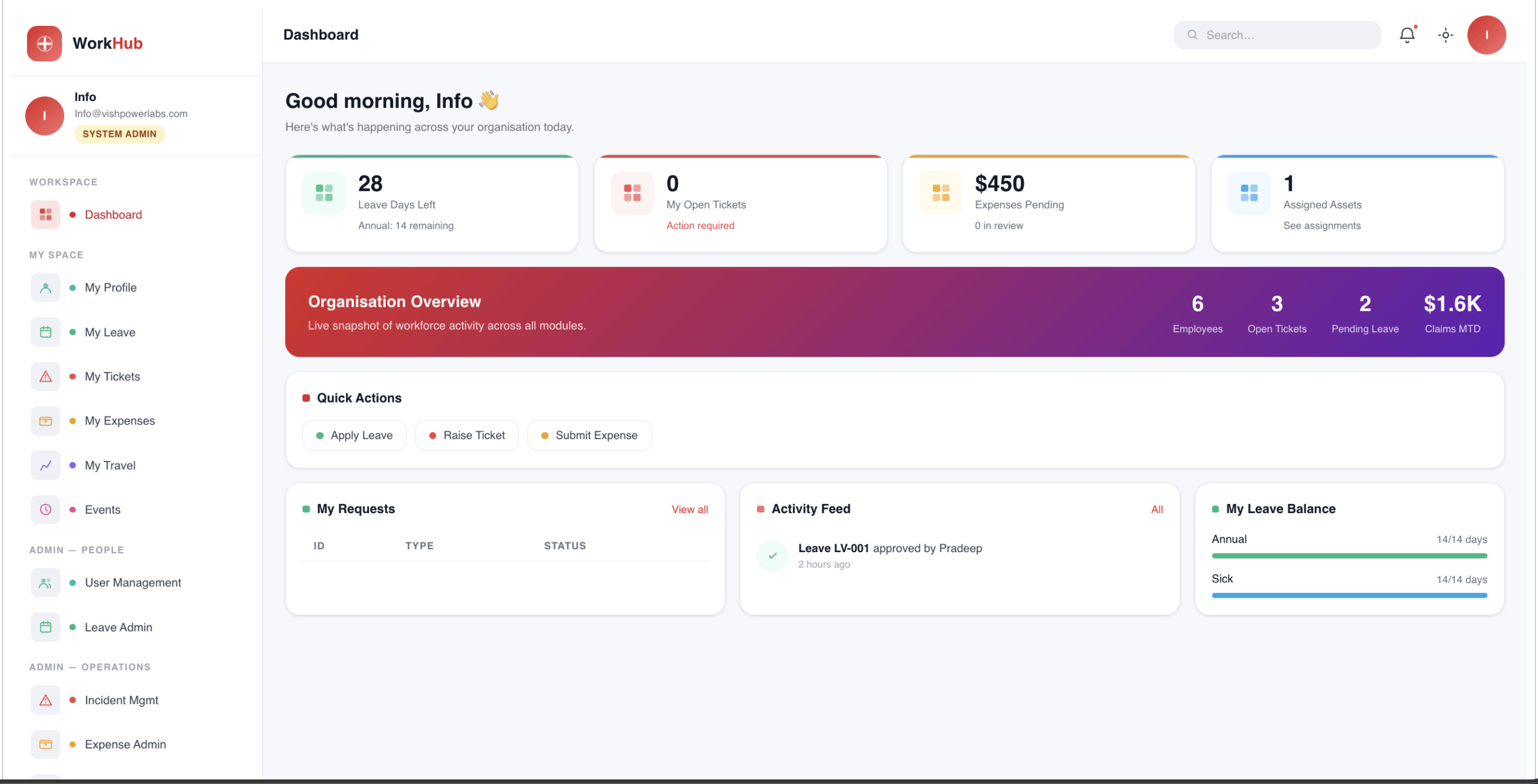
The SharePoint Framework version of the Microsoft 365 digital employee hub runs directly on your company intranet homepage and can be added to Microsoft Teams as a personal app. This is the deployment path that works for the widest range of organisations because it does not require any additional or premium licensing. Standard Microsoft 365 licences covering SharePoint are sufficient. If your organisation already runs on Microsoft 365, you can deploy this version today without touching the licensing budget.
The web part sits on the SharePoint page like any other component, but the experience it delivers is a long way from a standard SharePoint web part. The interface is built on React and Vite, giving it the responsiveness and polish of a consumer-grade application rather than something that looks like it shipped with Office 2013.
Power Apps Code Apps for Business Applications
The second deployment path for this digital employee hub uses Power Apps Code Apps, a newer capability in the Power Platform that allows developers to build and embed fully custom React-based applications directly within the Power Apps runtime. This is different from a standard canvas app. With Code Apps, you write the full application logic and UI in code, and Power Apps handles the hosting, authentication, and connector layer around it.
This path allows Power Platform architects to embed the same Microsoft 365 digital employee hub experience into custom business applications without rebuilding the interface from scratch. The trade-off is licensing: because Power Apps Code Apps run custom code and connect to external data at this level, a Power Apps Premium licence is required.
For organisations already running Power Apps Premium across their workforce, this path fits naturally into a broader low-code application ecosystem. The digital employee hub becomes one component inside a larger suite of business tools rather than a standalone intranet addition.
Role-Based Navigation That Actually Works
Generic navigation menus are one of the biggest reasons intranet adoption fails. When every employee sees every menu option regardless of their role, the interface becomes overwhelming and people stop trusting it to show them what matters.
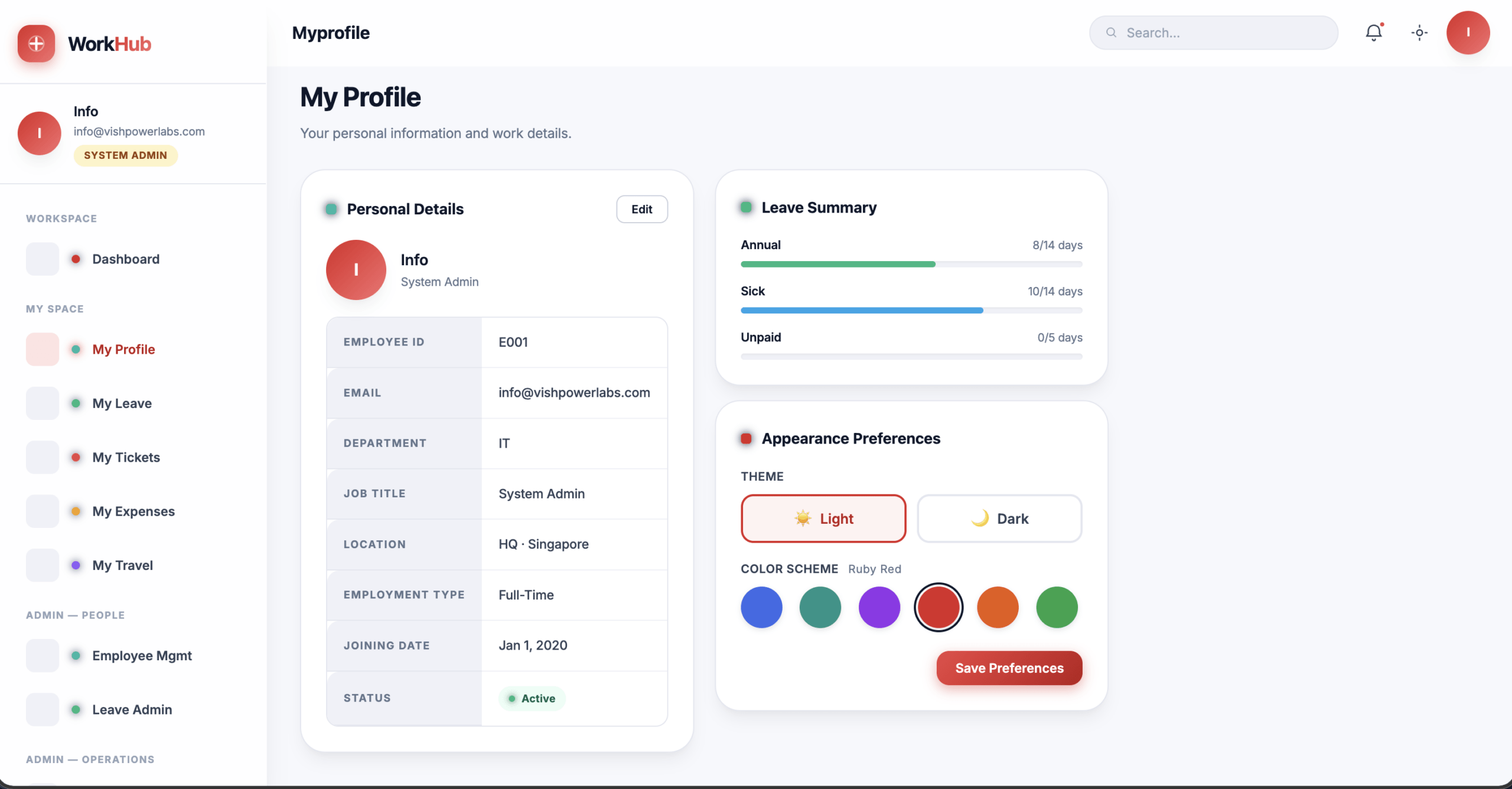
This Microsoft 365 digital employee hub reads the signed-in user’s role from a SharePoint list where each user is assigned a role by an administrator. Based on that assignment, the navigation builds dynamically to show only what that person is authorised to access. A Super Admin sees every module across the entire hub. An HR Admin sees leave administration, employee management, and HR-related tools only. An IT Admin sees the asset management queue, incident tickets, and IT operations. A standard employee sees their own leave balance, open tickets, submitted expenses, and company announcements.
No configuration is required at the individual user level. The digital employee hub checks the role list on each login and renders the correct navigation automatically. When someone changes roles, a SharePoint admin updates their entry in the role assignment list and the hub reflects that change immediately on next sign-in — no code change, no redeployment.
If you are building similar role-aware experiences on SharePoint, the SharePoint Online Site Scanner covered on this blog is a useful companion tool for auditing list permissions and site access across your environment before go-live.
SharePoint Lists as the Data Layer
One concern that comes up whenever you propose a new internal application is the backend infrastructure question. Does this need its own Azure SQL database? Does it require custom APIs? Who manages the data once the developers hand it over?
This digital employee hub uses SharePoint Lists as its data layer, and that is a deliberate and well-considered choice rather than a shortcut. SharePoint Lists handle the data storage for asset records, leave requests, IT tickets, expense submissions, and any other module you add to the hub. The lists are structured with proper column types, validation rules, and choice fields, so they work correctly both through the hub interface and when accessed directly from the SharePoint admin surface.
The practical benefit is that IT and HR teams can manage their own data without developer involvement. If the leave policy changes and you need to add a new leave type, a SharePoint admin adds the choice to the relevant column and the Microsoft 365 digital employee hub picks it up immediately. No deployment, no code change, no ticket to the development team.
Automated Provisioning with PowerShell
Setting up all the required lists, columns, and configuration manually across every environment would be error-prone and time-consuming. The digital employee hub project includes a PowerShell deployment script called Deploy-IntranetApp.ps1 that handles the entire SharePoint provisioning process automatically.
Running this script against a target site scaffolds every list, every column, and every view definition in seconds. This makes it straightforward to deploy the hub to a development environment, test thoroughly, and then run the same script against your production tenant with confidence that the structure will be identical. It also simplifies disaster recovery, since you can recreate the entire backend in under a minute if needed.
For organisations that manage multiple business units or regional tenants, the script can be parameterised to target different sites, which keeps the deployment process consistent and auditable. If you are new to automating SharePoint provisioning, the Microsoft 365 Copilot and Power Platform post on this site covers broader automation patterns that pair well with this approach.
The Design System Behind the Interface
A lot of internal tools feel disposable because they look like they were designed disposably. This Microsoft 365 digital employee hub takes a different approach by building from a proper CSS custom property system that governs every colour, spacing value, and component style in the application.
Dark mode is included out of the box and switches based on the user’s system preference without requiring any toggle or setting. Micro-animations on card hover states, loading transitions, and navigation changes give the digital employee hub a responsiveness that makes it feel closer to a well-built consumer product than a corporate dashboard.
Personalised avatars pull from the Microsoft 365 user profile, so the experience greets employees by name with their actual profile photo rather than a generic icon. Gradient UI elements and a consistent visual language across every module mean that adding a new service to the hub feels like extending the same product rather than bolting on something new.
Because the design system is built on CSS custom properties rather than hardcoded values, organisations can adjust the colour scheme to match their brand in a single configuration file without touching any component code.
Mobile First for the Hybrid Workforce
One of the biggest practical tests for any internal tool is whether it actually works on a phone. Most corporate intranets fail this test badly. Either the layout breaks on small screens, or key features are hidden behind interactions that do not translate well to touch.
Because this digital employee hub is built on React with a responsive layout grid and touch-friendly component design, it works correctly on mobile browsers and within the Teams mobile app. An employee can check their leave balance from the airport, raise a hardware request from a site visit, or approve a pending expense from their phone without any degraded experience compared to the desktop version.
For global and hybrid organisations where a significant portion of the workforce is never at a desk, this is not a nice-to-have. It is a baseline requirement that most intranet solutions still fail to meet, and it is one area where this Microsoft 365 digital employee hub consistently delivers.
Get the Open-Source Project on GitHub
The full Digital Employee Hub project is open-source and free to use. Everything you need to deploy a production-ready Microsoft 365 intranet is in the repository.
The project ships in two versions so you can pick the right fit for your organisation:
SPFx Web Part runs on your SharePoint intranet and pins as a Teams personal app. Works with standard Microsoft 365 licences. No additional licensing cost.
Power Apps Code Apps embeds the full hub inside your Power Platform business applications. Requires a Power Apps Premium licence.
Both versions share the same React codebase, the same role-based navigation, and the same dark mode design system. You get an identical experience across both deployment paths.
The repo also includes the Deploy-IntranetApp.ps1 PowerShell script that provisions every SharePoint list, column, and configuration automatically. One script, any tenant, any site. The script has been tested on SharePoint Online across multiple Microsoft 365 commercial tenants.
Find a bug or want a new module? The GitHub Discussions thread is the right place. Drop your feedback, feature requests, or integration ideas there and it goes straight into the roadmap.
What Comes Next for the Digital Employee Hub
The current version of the Microsoft 365 digital employee hub covers the core employee service modules: leave management, IT asset requests, expense tracking, company announcements, and role-based administration views. Upcoming modules in active development include a desk booking system for hybrid workplaces, an onboarding checklist for new joiners, and a team directory that surfaces richer Microsoft 365 profile data than the default SharePoint people search.
The goal is to keep the architecture lean enough that organisations can add or remove modules based on their specific needs without having to fork the codebase or maintain a divergent branch. Each module is a self-contained component that plugs into the hub’s shared data and authentication layer.
If you are building something similar or have a specific integration requirement that would make this digital employee hub more useful for your organisation, the GitHub Discussions thread is the right place to raise it.
For more Microsoft 365 architecture guides, SPFx development walkthroughs, and Power Platform practitioner content, visit wrvishnu.com. This blog is written by WR Vishnu, a Microsoft Solutions Architect with over 18 years of enterprise Microsoft platform delivery experience across SharePoint Online, Power Platform, and Microsoft 365 Copilot implementations in enterprise and government sectors.
Who This Project Is Built For
This digital employee hub is a practical starter project aimed at three groups. First, IT teams in small and mid-size organisations that are on Microsoft 365 but do not have the budget or headcount to evaluate, procure, and integrate a dedicated HR platform. Second, SharePoint developers and Power Platform architects who need a working reference implementation they can extend rather than build from scratch. Third, Microsoft 365 consultants and managed service providers who want a deployable foundation they can adapt for client environments quickly.
The project is not designed to replace a full enterprise HRIS for a 5,000-person organisation. It is designed to give organisations of 20 to 500 employees a production-ready employee portal that covers the services their people actually need, using the licences they already have, without a six-month implementation project.
Frequently Asked Questions
What is a Microsoft 365 digital employee hub?
A Microsoft 365 digital employee hub is a unified intranet portal built on SharePoint Online, Teams, and Power Apps that brings internal services like leave requests, IT helpdesk, and expense management into a single role-aware interface. Employees access everything they need from one place without switching between disconnected systems. The digital employee hub reads the signed-in user’s role from a SharePoint list to show each person only the tools and data relevant to their role. Based on real-world deployments, organisations that centralise these services into a single portal see significantly faster employee adoption compared to fragmented tool landscapes.
Does building a digital employee hub on Microsoft 365 require a premium licence?
It depends on the deployment path. The SPFx web part version of the digital employee hub runs on standard Microsoft 365 licences that include SharePoint Online and requires no additional licensing. The Power Apps Code Apps version requires a Power Apps Premium licence because it runs fully custom React code within the Power Apps runtime and connects to external data sources.
What is the difference between SPFx and Power Apps Code Apps for a digital employee hub?
SPFx deploys the Microsoft 365 digital employee hub as a web part on a SharePoint intranet page and as a Teams personal app using standard M365 licences. Power Apps Code Apps is a newer Power Platform capability where developers write a full React application hosted within the Power Apps runtime, suited for organisations embedding the digital employee hub inside broader Power Platform business applications. Power Apps Code Apps requires a Premium licence.
How does role-based navigation work in a SharePoint employee hub?
The digital employee hub reads the signed-in user’s role from a SharePoint list where administrators assign roles manually. Based on that role, the navigation renders dynamically at login. A Super Admin sees all modules. An HR Admin sees HR-related tools only. An IT Admin sees asset management and incident ticketing. Standard employees see their own leave, tickets, expenses, and announcements. When a user’s role changes, the SharePoint admin updates the list entry and the hub reflects it on next sign-in automatically.
Can the digital employee hub be deployed to multiple Microsoft 365 tenants?
Yes. The Microsoft 365 digital employee hub project includes a PowerShell provisioning script called Deploy-IntranetApp.ps1 that automates the creation of all required SharePoint lists, columns, and configuration. The script can be parameterised to target any SharePoint site collection on any tenant, making consistent deployment across multiple business units or environments straightforward.
Is the Microsoft 365 digital employee hub open source?
Yes. The full source code for both the SPFx and Power Apps Code Apps versions of the digital employee hub is published on GitHub at github.com/WRVish/digital-workplace-employee-hub. The repository includes the React codebase, the PowerShell provisioning script, and deployment documentation for both paths.